
Zmina icon
Zmina icon

Zmina

Zmina is a clipboard for people who copy and paste all day. Instead of just storing history, it sees what you copied and which app you're pasting into, then offers a short list of relevant actions.
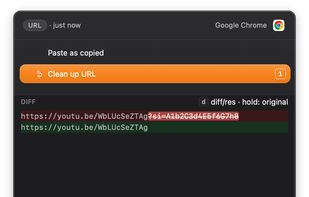
Smart Paste.
Removing tracking parameters from URL before pasting.

Cost / License

  • Pay once
  • Proprietary

Application type

Platforms

  • Mac  Requires macOS 14 (Sonoma) or later.
1like
0comments
0articles

Features

Properties

  1.  Privacy focused
  2.  Lightweight

Features

  1.  Ad-free
  2.  Works Offline
  3.  Dark Mode
  4.  Full-Text Search
  5.  No Tracking
  6.  No registration required
  7.  Clipboard monitoring
  8.  Copy & paste actions

Zmina News & Activities

Highlights All activities

Recent activities

Zmina information

  • Developed by

    CA flagMykhailo Onikiienko
  • Licensing

    Proprietary and Commercial product.
  • Pricing

    One time purchase (perpetual license) that costs $35.
  • Alternatives

    5 alternatives listed
  • Supported Languages

    • English

AlternativeTo Category

Office & Productivity

Popular alternatives

View all
Zmina was added to AlternativeTo by Mykhailo Onikiienko on and this page was last updated .
No comments or reviews, maybe you want to be first?

What is Zmina?

Zmina is built around a simple observation: the work of copy and paste is rarely just moving text. Often you need to do some work in between. You copy a link and have to remove the tracking codes before sharing it. You copy code from a terminal and have to wrap it so chat doesn't break its formatting. You copy a log line to file a bug report and have to remove the secret first. Every clipboard manager on the market stores what you copied. Almost none of them help with what happens when you paste.

Zmina's main feature, Smart Paste, does exactly that. When you trigger it, a small popup opens over the app you're pasting into, listing the actions that fit what you copied and where it is going. Number keys to choose, Enter to paste, and you can run more than one change in a row. You see a preview of the result before anything commits, so nothing is applied that you have not looked at. The right version of the text lands in the right place in one keystroke, instead of pasting into a temporary document first to clean it up.

Behind Smart Paste is a full Clipboard History. Everything you copy is labelled by type and searchable, so you can find something from an hour ago by filtering for links, addresses, snippets, or items that contain a secret. You can run the same changes on a past item without pasting it anywhere, which makes it a quick way to clean text up before sharing it.
