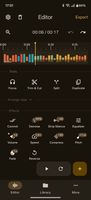
ZEEP is a multitrack audio editor for Android phones and tablets. Clips sit on lanes, and every change plays the moment you make it, with nothing to render and nothing to wait for.
There are no ads. No account, no login. The editor is free: every tool, every lane, every export format. Editing runs entirely on your device, and ZEEP never receives your recordings, so they are never used to train AI.
Cutting with regions
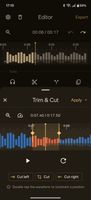
Mark a part of a recording with a double-tap on each edge, then cut it out, turn it up or down, make it shorter or longer, or fill it with a pause. ZEEP fills a pause with a quiet stretch of the same recording when it finds one, so the gap keeps the sound of the room. Your own short sounds, like a breath or an "okay", can fill a region too. Every cut keeps a restore button, and a one-finger timeline pad moves the playhead and the region edges.
Podcasts, voice-overs and interviews
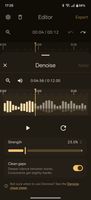
The Noise gate learns the steady noise in a clip and lowers it while the voice stays as recorded. De-noise removes background noise from a voice with an AI model (DeepFilterNet) that runs on the phone. De-click repairs mouth clicks and lip smacks, the De-esser softens harsh "s" sounds, and Strip Silence takes out long pauses. In Volume, the Leveler brings quiet and loud sentences closer, and Match brings a clip to your loudness target in LUFS with one tap.
Multitrack with ripple editing
Lanes hold as many clips as you like. Drag a clip in time or onto another lane. Ripple delete, move and align make the later clips follow, on one lane or on all lanes, so the lanes stay in sync. Split, join, duplicate, mute or reverse clips, or apply effects for good with Commit.
Tools for every clip
Volume with a live LUFS meter, fades, a parametric equalizer with a live analyzer and hum removal, a compressor with presets and a gain reduction meter, and realtime speed and pitch with a "Keep natural sound" option. Audio is processed in 32-bit float at 48 kHz, and a true-peak limiter keeps loud exports from clipping.
Import and export
Record straight onto a lane, or import almost any audio format and the sound from video files. Export to MP3 (128, 192 or 320 kbps), M4A / AAC, WAV (16, 24 or 32-bit float) or FLAC, in mono or stereo.
ZEEP Pro is an optional subscription for the Library only: folders, Projects and OneDrive sync. The editor does not need it.







 EU

 Ondrej-Zoricak added ZEEP as alternative to Tenacity, TwistedWave, Aspect - Audio Files Spectrogram Analyzer, Audacity and 2 more

 ZOR.O Software s. r. o.


No comments or reviews, maybe you want to be first?