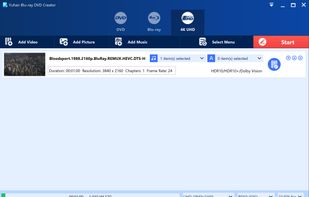
Yuhan Blu-ray DVD Creator is an all-in-one disc authoring suite for creating 4K UHD Blu-ray, Blu-ray, and DVD projects from videos, photos, and music. It includes three powerful modules: UHD Creator, Blu-ray Creator, and DVD Creator.
With a simple workflow and flexible output options, you can easily burn media files to disc, create Blu-ray/DVD folders, or generate ISO image files. The software also includes advanced features such as HDR and Dolby Vision retention, high-quality audio preservation, customizable disc menus, chapter editing, subtitle and audio track selection, and both transcoding and pass-through modes.
Key Features:
--Burn almost all popular video formats to 4K UHD Blu-ray, Blu-ray, or DVD, including AVI, M4V, FLV, MTS, TS, M2TS, MKV, MP4, MPG, MPEG, MOV, RMVB, VOB, WMV, ASF, and WEBM.
--Create 4K UHD Blu-ray, Blu-ray, or DVD discs from image files, including JPG, JPEG, BMP, HEIC, HEIF, TIFF, TIF, PNG, GIF, and WEBP.
--Add music and audio files to 4K UHD Blu-ray, Blu-ray, or DVD projects, supporting formats such as AAC, AC3, WAV, FLAC, MKA, MP3, M4A, OGG, WMA, APE, DTS, OPUS, and MLP / Dolby Atmos.
--Retain HDR video effects, including HDR10, HDR10+, and Dolby Vision when the source video contains supported HDR metadata. Dolby Vision is supported in single-layer MKV/MP4 files and dual-layer M2TS files.
--Preserve high-quality Blu-ray audio formats, including Blu-ray PCM, TrueHD / Dolby Atmos, DTS-HD Master Audio, and EAC3.
--Burn videos to UHD Blu-ray or Blu-ray at common frame rates, including 23.976 fps, 24 fps, 25 fps, 29.97 fps, 50 fps, and 59.94 fps.
--Support three output types: folder, ISO image file, and direct burning to disc.
--Support both transcoding and pass-through modes for 4K UHD Blu-ray and Blu-ray creation.
--Automatically import chapters from video files, or create and customize chapters manually.
--Add a disc menu from built-in templates, or customize the menu freely by adding background music, background images, background videos, first-play video clips, and menu effects.
--Edit different levels of disc menus, skip the menu when needed, and customize the overall menu playback experience.
--Support four scene menu display modes: File Icon, File Text, Chapter Icon, and Chapter Text.
--Burn HDR videos to Blu-ray or DVD while avoiding washed-out colors.
--Automatically rotate vertically recorded videos for proper playback.
--Select multiple subtitle and audio tracks for output, or add external subtitle files.
--Support three highlight display modes: box highlight, underline highlight, and text color highlight.
--Create Extras or Bonus Features submenus for additional content.
--Support pop-up menus for Blu-ray and UHD Blu-ray projects.








 Flory Anthony added Yuhan Blu-ray DVD Creator as alternative to Cyberlink Power2Go
 Flory Anthony added Yuhan Blu-ray DVD Creator as alternative to DVDStyler, DVDFab DVD Creator, WinX DVD Author, DVDAuthorGUI and 10 more


No comments or reviews, maybe you want to be first?