
Writer Studio icon
Writer Studio icon

Writer Studio

Free offline novel-writing app with scene planning, a Book Wiki, local Markdown files, version history, and DOCX/EPUB export.
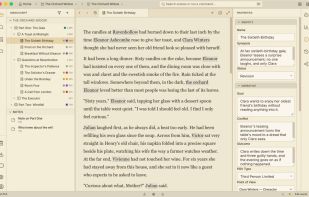
Manuscript editor with chapter and scene navigation, plus scene properties for goal, conflict, outcome, and point of view.

Cost / License

  • Free
  • Proprietary

Application type

Platforms

  • Mac
  • Windows
  • Linux
0likes
0articles
Save

Features

Properties

Features

Highlights All activities

Writer Studio News & Activities

Recent activities

Writer Studio information

AlternativeTo Category

News & Books
Writer Studio was added to AlternativeTo by ralist on and this page was last updated .

No comments or reviews, maybe you want to be first?

Official Links

What is Writer Studio?

Writer Studio is a free desktop app for fiction authors on Windows, macOS, and Linux. Plan, write, revise, and export a novel in one local workspace. Core writing works offline and needs no account.

Organize a manuscript into scenes, chapters, and parts; reorder it with drag and drop; and keep character, location, and plotline records beside the text in the Book Wiki. Use scene cards, research notes, full-text search, writing goals, and version history while developing a draft.

Manuscripts are stored as readable Markdown files, with metadata in JSON. Autosave, local backups, and per-scene version history help protect your work. Import a Word document with a preview, and export to DOCX, EPUB, FB2, PDF, or Markdown.

AI is optional and off by default. Choose your own provider key or use Ollama for local AI; changes to your writing require your approval. Authr Plus provides optional managed AI through Authr AI. Publishing and full reader analytics are free and unlimited. Encrypted cloud backup and sync are planned and are not available yet.

Writer Studio is currently in public alpha. A project can contain multiple books; the Book Wiki belongs to each book.