
WordByWord.io icon
WordByWord.io icon

WordByWord.io

Language immersion tool with Chrome extension integrating websites, YouTube, and PDFs, offers instant translation, knowledge-based comprehension scoring, flashcards, smart spaced repetition, progress tracking, color-coded vocabulary status, and supports over 50 languages.
Spotlight

Cost / License

  • Freemium (Subscription)
  • Proprietary

Platforms

  • Online
  • Google Chrome
1like
1comment
0articles

Features

Properties

  1.  Lightweight
  2.  Educational
  3.  AI-Powered

Features

  1.  Cloud Sync
  2.  Built-in Dictionary
  3.  No registration required
  4.  Text to Speech
  5.  PDF annotation
  6.  Ad-free
  7.  Dark Mode
  8.  No Tracking
  9.  Website Translation
  10. YouTube icon  Youtube integration
  11.  AI-Translation
  12.  Translator

WordByWord.io News & Activities

Highlights All activities

Recent activities

WordByWord.io information

  • Developed by

    Unknown
  • Licensing

    Proprietary and Freemium product.
  • Pricing

    Subscription that costs up to $6 per month + free version with limited functionality.
  • Alternatives

    68 alternatives listed
  • Supported Languages

    • English
    • German
    • Russian

Our users have written 1 comments and reviews about WordByWord.io, and it has gotten 1 likes

WordByWord.io was added to AlternativeTo by Vladimir Dolnikov on and this page was last updated .

Comments and Reviews

   
Vladimir Dolnikov
0

Really useful for learning words while browsing, watching YouTube, or reading PDFs

Review from a new or low-activity account — shown here, but not counted in the app rating.

What is WordByWord.io?

WordByWord is a system that enhances language learning through immersion reading. It identifies unfamiliar words, translates them instantly, and predicts if a page or video is suitable for your level.

The comprehension level feature prevents you from wasting time on content that is too challenging. It compares the content with your vocabulary and provides a precise percentage of words you know. It categorizes content into four zones: Easy, Your level, Challenging, and Too hard, and forecasts the most frequent new words that could improve your understanding.

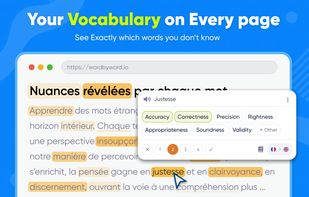
The spotlight mode highlights unknown words on any webpage and hides known ones. The words are color-coded based on their learning status and you can update their status directly on the page. This feature helps you track your vocabulary growth over time.

Unlike other apps, WordByWord works with the content you are interested in, such as websites, online articles, YouTube subtitles, PDFs, blogs, news, books, and research papers.

The YouTube learning feature turns any video into a language lesson. You can translate and save subtitle words with a single click and navigate by subtitles instead of seconds. It also provides a comprehension score for the video before you play it.

The PDF translator allows you to translate words directly inside the document, making it ideal for books, textbooks, and research papers. It works with both local and online files and scores the coverage page by page as you read.

The vocabulary trainer offers multiple training modes and smart spaced repetition. It allows you to train only the words you need and review them with flashcards. You can import and export your vocabulary and monitor your knowledge of each word.

WordByWord supports over 50 languages. The comprehension score works in every language you learn by comparing content against your vocabulary, not against English.

Users can use WordByWord for various purposes such as picking a series, filtering a reading list, getting through a textbook, and studying with YouTube.

Unlike basic translators, WordByWord lets you identify known and unknown words, determine if content is at your level, build your vocabulary faster with real content, track your progress visually, focus only on the words you still need to learn, and continue learning wherever you read.

Official Links