WMM - Wallpaper Multi-Monitor Manager icon

WMM - Wallpaper Multi-Monitor Manager

A wallpaper manager for multi-monitor setups on Cinnamon and GNOME Shell. Forget distorted, cropped or repeated backgrounds. With WMM, you are in full control.
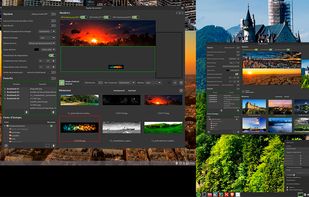
WMM - Wallpaper Multi-Monitor Manager screenshot 1

Cost / License

Platforms

  • Linux
0likes
0comments
0articles

Features

Properties

  1.  Privacy focused

Features

  1.  No Tracking
  2.  Works Offline
  3.  No registration required
  4.  Dark Mode

WMM - Wallpaper Multi-Monitor Manager News & Activities

Highlights All activities

Recent activities

WMM - Wallpaper Multi-Monitor Manager information

  • Licensing

    Open Source (GPL-3.0) and Free product.
  • Written in

  • Alternatives

    4 alternatives listed
  • Supported Languages

    • English
    • Spanish
    • Catalan; Valencian

AlternativeTo Category

OS & Utilities

GitHub repository

  •  2 Stars
  •  0 Forks
  •  0 Open Issues
  •   Updated  
View on GitHub
WMM - Wallpaper Multi-Monitor Manager was added to AlternativeTo by Maki on and this page was last updated .
No comments or reviews, maybe you want to be first?

What is WMM - Wallpaper Multi-Monitor Manager?

WMM - Wallpaper Multi-Monitor Manager

A wallpaper manager for multi-monitor setups on Cinnamon and GNOME Shell. Forget distorted, cropped or repeated backgrounds. With WMM, you are in full control.

? Main features

  • Real multi-monitor management: Assign different wallpapers to each monitor or "span" a panoramic image across all of them.
  • Image assignment: Tries to match the most suitable image to each monitor based on its orientation (Vertical-Horizontal).
  • Flexible aspect modes: Control how the image fits: Scaled (no distortion), Zoom (fill by cropping) or Stretched (fill by distorting).
  • Visual effects: Apply Sepia or Black and White filters to images per monitor.
  • Background effects: Apply Blur or Color effects to the background if the image does not fill the entire monitor area.
  • Automatic rotation: Set a timer to change wallpapers automatically, either synchronously or asynchronously.
  • Favorites (Presets): Save your favorite wallpaper combinations as "Presets" and load them instantly.
  • Internationalization: Interface ready for multiple languages (English, Spanish, Catalan), with its own translation domain, completely independent of the desktop environment.
  • Multi-environment compatibility: Works on both Cinnamon and GNOME Shell. The installer detects your desktop and automatically copies the correct files.

🖥? Supported environments

| Desktop | Support | Notes | |--------------------|---------------|-------------------------------------------------------| | Cinnamon | X11 | Native applet with all features | | GNOME Shell | Full | Extension with a context menu identical to Cinnamon's | | KDE Plasma | In development| Platform module prepared | | Windows / macOS| Planned | Platform modules already sketched out |

🌍 Translation

WMM supports multiple languages. Translations are installed automatically when running install.sh.

  • Source files are located in /po folder of project.
  • Interface will automatically display in your language if translations are available.
  • All translatable strings are centralized in WMM's own domain, completely independent of the system translations. This guarantees compatibility with any desktop or operating system.

If you want to help us translate WMM into your language, you are more than welcome!

📜 License

WMM is distributed under GPL-3.0. You are free to use, modify and distribute this software, as long as you keep same license and attribution to original authors.

Official Links