





Winhance
15 likes
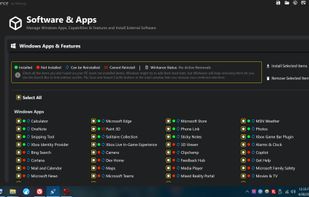
Winhance is a C# application designed to optimize and customize your Windows experience. From software management to system optimizations and customization, Winhance provides functions to enhance Windows 10 and 11 systems.

Cost / License
- Free
- Open Source
Application type
Platforms
- Windows


Features
Highlights All activities
Winhance News & Activities
Recent activities
- fartmaster liked Winhance
 ProtagonistLabs added Winhance as alternative to Protagonist Sysoptimizer
- kramermillay liked Winhance
The Chris Titus tool is great for downloading a whole bunch of third party apps. But Winhance's UI and fine tuning of individual Windows settings is on another level entirely. It just has a few odd things that slightly annoys me, such as recommending No Lock screen, which is absurd, because that's a quality of life Windows feature, not an obstacle. And the fact that it recommends disabling UAC is just irresponsible. But like I said, really great UI.
- brokesimp69 liked Winhance
- Oklonsica liked Winhance
 TheEmperorArt added Winhance as alternative to Kudu Cleaner
- nesterchuk_com liked Winhance
- Mark added Works Offline as a feature to Winhance


Developed by
memstechtipsLicensing
Open Source and Free product.Written in
Alternatives
16 alternatives listedBadge
Get an embeddable badge for WinhanceSupported Languages

AlternativeTo Category
OS & UtilitiesGitHub repository
- 13,464 Stars
- 646 Forks
- 65 Open Issues
- Updated


Open source and free softwares (Best alternatives)
A list with 53 apps by zapiboss without a description.


Workplace
My setup.
List is ordered by estimated playtime.
Comments and Reviews
I like because its made with winUI3 and because of the prepare another system feature.
The Chris Titus tool is great for downloading a whole bunch of third party apps. But Winhance's UI and fine tuning of individual Windows settings is on another level entirely. It just has a few odd things that slightly annoys me, such as recommending No Lock screen, which is absurd, because that's a quality of life Windows feature, not an obstacle. And the fact that it recommends disabling UAC is just irresponsible. But like I said, really great UI.