WindowsGSH icon
WindowsGSH icon

WindowsGSH

 1 like

WindowsGSH is a Windows game server hub for installing, configuring, monitoring, and controlling dedicated servers through native modules, Discord integration, and secure management tools.
WindowsGSH screenshot 1

Cost / License

  • Free
  • Open Source

Application type

Since

  • Since 2026 (updated Nov 2026)

GitHub

  • GitHub stars: 3

Platforms

  • Windows
1like
0articles
Save

Features

Features

Highlights All activities

WindowsGSH News & Activities

Recent activities

WindowsGSH information

AlternativeTo Category

System & Hardware

GitHub repository

  •  3 Stars
  •  0 Forks
  •  2 Open Issues
  •   Updated  
View on GitHub
WindowsGSH was added to AlternativeTo by shenniko on and this page was last updated .

No comments or reviews, maybe you want to be first?

Official Links

What is WindowsGSH?

WindowsGSH is a Windows desktop application for installing, configuring, running, updating, and monitoring dedicated game servers from one central interface.

Game support is provided through an extensible module system, allowing Steam, Java, and standalone dedicated servers to be supported without adding game-specific behaviour to the core application.

WindowsGSH includes SteamCMD and Steam Guard integration, live console access, server configuration tools, file verification, backups and restoration, scheduled tasks, automated updates, crash recovery, performance monitoring, and firewall and port-management tools. Optional browser-based management and Discord integration provide remote status monitoring, alerts, and authorised server controls.

The application is intended for home-server owners, gaming communities, and administrators who want to self-host multiple dedicated game servers on Windows without managing each server through separate command-line tools and scripts.

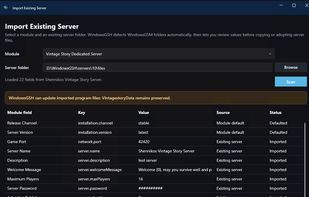
WindowsGSH is a successor and alternative to WindowsGSM, focused on active development, modern Windows support, security, reliability, and extensibility. Compatible WindowsGSM server installations can also be imported to simplify migration.