
Windows Dual Audio Manager icon

Windows Dual Audio Manager

A lightweight application that allows Windows users to output audio to multiple devices simultaneously, with individual volume control for each output.
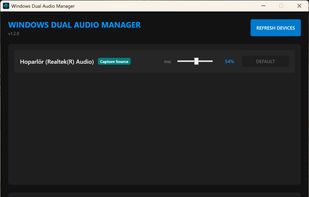
Windows Dual Audio Manager screenshot 1

Cost / License

  • Free
  • Open Source (MIT)

Platforms

  • Windows  Windows 10+
0likes
0comments
0articles

Features

No features, maybe you want to suggest one?

Windows Dual Audio Manager News & Activities

Highlights All activities

Recent activities

Windows Dual Audio Manager information

  • Developed by

    MaheshSharan
  • Licensing

    Open Source (MIT) and Free product.
  • Written in

  • Alternatives

    1 alternatives listed
  • Supported Languages

    • English

GitHub repository

  •  6 Stars
  •  0 Forks
  •  0 Open Issues
  •   Updated  
View on GitHub

Popular alternatives

View all
Windows Dual Audio Manager was added to AlternativeTo by Emin on and this page was last updated .
No comments or reviews, maybe you want to be first?

What is Windows Dual Audio Manager?

Route your system audio to multiple output devices simultaneously — speakers, headphones, Bluetooth — with per-device volume control.

Fan-out audio — play the same system audio on multiple devices at the same time Per-device volume control — independently adjust each output's level Low-latency pipeline — event-driven WASAPI routing (~30–45ms), not polling buffers Feedback loop protection — the app blocks you from enabling the capture source device as an output (which would cause an echo loop) and explains why Device hotplug — detects when a device is disconnected mid-session and stops that channel cleanly System tray — runs quietly in the background, restore with a double-click Dark / Light theme — auto-detects your Windows theme preference Startup with Windows — optional, configurable in Settings