


Windows Disk Defragmenter
32 likes
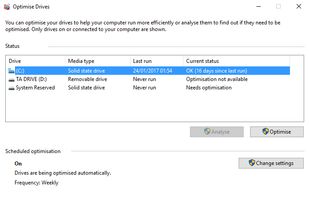
Disk Defragmenter is a computer program included in Microsoft Windows designed to increase access speed by rearranging files stored on a disk to occupy contiguous storage locations, a technique commonly known as defragmenting.

Cost / License
- Free
- Proprietary
Application type
Platforms
- Windows

Features
Highlights All activities
Windows Disk Defragmenter News & Activities
Recent activities
- b9wzo9tz liked Windows Disk Defragmenter
 TheEmperorArt added Windows Disk Defragmenter as alternative to Disk SpeedUp

Developed by
 Microsoft
 Licensing
Proprietary and Free product.Alternatives
22 alternatives listedBadge
Get an embeddable badge for Windows Disk DefragmenterSupported Languages


Core, Development & Services
A list with 807 apps by AmileyaRyver without a description.


Windows Maintenance
A list with 9 apps by EzraZebra without a description.


Fav Defragmenter Programs
A list with 9 apps by ferfp without a description.
Comments and Reviews
It's enough for me. It's simple, detects the type of drive, supports scheduling and automatically adds new drives. I think it's even setup automatically when you install Windows 10.
The schedule sometimes runs when it wants. You can't specify the time, only frequency.
Sadly it doesn't support the ExFAT filesystem at the moment