

WinAppMigrator icon
WinAppMigrator icon

WinAppMigrator

 Like

WinAppMigrator turns an app installed on one Windows PC into one installer you can run on another PC. It works backward from what is installed, so it helps when the original setup file is lost, the company that made the app is gone, or the old PC will not even start.
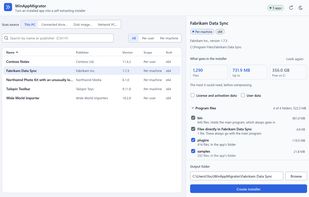
An app selected, showing how big its installer can be, whether that fits, and what goes in it

Cost / License

  • Free
  • Open Source (MIT)

Since

  • Since 2026 (updated Nov 2026)

GitHub

  • GitHub stars: 43

Platforms

  • Windows  Runs on Windows 10 and 11, x64 (Windows 11 on Arm through emulation). Moves apps from Windows 7 and later.
0likes
0articles
Save

Features

Highlights All activities

WinAppMigrator News & Activities

Recent activities

WinAppMigrator information

  • Developed by

    Randy Northrup
  • Licensing

    Open Source (MIT) and Free product.
  • Written in

  • Alternatives

    3 alternatives listed
  • Badge

    Get an embeddable badge for WinAppMigrator
  • Supported Languages

    • English
    • Italian
    • German
    • French
    • Spanish
    • Portuguese
    • Dutch
    • Polish
    • Russian
    • Ukrainian
    • Turkish
    • Arabic
    • Persian
    • Hebrew
    • Hindi
    • Bengali
    • Urdu
    • Indonesian
    • Vietnamese
    • Thai
    • Japanese
    • Korean
    • Chinese

AlternativeTo Category

Backup & Sync

GitHub repository

  •  43 Stars
  •  1 Fork
  •  1 Open Issue
  •   Updated  
View on GitHub
WinAppMigrator was added to AlternativeTo by Randy-Northrup on and this page was last updated .

No comments or reviews, maybe you want to be first?

Official Links

What is WinAppMigrator?

WinAppMigrator turns an app installed on one Windows PC into one installer you can run on another PC. It works backward from what is installed, so it helps when the original setup file is lost, the company that made the app is gone, or the old PC will not even start.

Pick the app from this PC, from a drive pulled out of another PC, from a .vhd or .vhdx image of one, or from an old Windows 7 or later PC over your network through the small, signed WinAppMigrator Client. Before you build anything, it shows what would go in the installer and how big that can be, and you can leave out what you do not want.

The installer carries the app's files, registry entries, services and drivers, scheduled tasks, shortcuts, and the Visual C++ and .NET runtimes it needs, and your user data and license data if you choose. It never copies what looks like a password, token or private key, and it never gets around activation. The installer checks its own hashes before writing anything, checks every file it installed afterwards, puts back what it did if anything fails, and leaves an uninstaller in Settings.

It is free and open source under the MIT license, one portable signed .exe with nothing to install. Five real open-source apps are moved between fresh machines on every change, but desktop Windows 10 and 11 on x64 are not part of those tests, and apps with online activation and loading a driver have not been tried yet, so try an installer before you rely on it.