WhatPulse is a cross-platform computer activity tracking and personal analytics application that helps you understand how you spend your time, where your attention goes, and how you interact with your computer.
Unlike traditional time-tracking applications, WhatPulse combines time spent with actual input activity, such as keystrokes, mouse clicks, and scrolling, to provide a more complete picture of your digital habits. It runs quietly in the background, automatically collecting statistics without interrupting your workflow.
Key features:
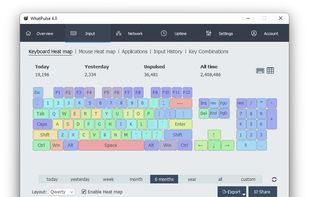
- Keyboard tracking: Track keystrokes, word counts, keyboard shortcuts, typing patterns, and visualize your most-used keys through interactive heatmaps.
- Mouse tracking: Measure clicks, scrolling, mouse movement, and distance traveled, with detailed heatmaps across multiple monitors.
- Application usage tracking: See how much time and effort you spend in individual applications, down to specific window titles, documents, and projects.
- Website usage tracking: Analyze time spent and input activity on individual websites through dedicated browser extensions.
- Productivity analytics: Explore historical trends, categorize applications and websites, and identify changes in your digital habits through detailed dashboards.
- Network monitoring: Monitor upload and download traffic, bandwidth consumption, and network usage per application.
- Computer uptime: Track computer uptime, active time, idle time, and reboot history.
- Cross-device analytics: Combine statistics from multiple computers into a single account for a complete overview of your computer usage.
- Gamification and community: Earn achievements, join teams, compete on global leaderboards, and participate in weekly WhatPulse Leagues with competitive divisions ranging from Bronze to Legend.
- Customization and data exports: Create activity profiles, build custom real-time statistics displays, and export your data for further analysis.
WhatPulse is designed for knowledge workers, developers, gamers, content creators, and anyone curious about their digital habits. Whether you want to improve your productivity, better understand your work-life balance, or simply see how many keystrokes you rack up in a year, WhatPulse makes your computer activity measurable and insightful.
Available for Windows, macOS, and Linux, with a free plan and an optional Premium subscription for advanced analytics and additional features.



 EU


 Heisen47 added WhatPulse as alternative to Produchive
 VANTA_LAYER_Systems added WhatPulse as alternative to CraftTimeLog



 WhatPulse - Martijn Smit


Comments and Reviews
The statistics are too uninformative. Heat map is funny, but why can't I see what hours I usually use my PC? That would be much more useful.
WhatPulse allows us to track the activity of our devices, be it the count of keys and clicks pressed, the bandwidth and the time of our frequently used apps. The great attraction is being able to participate collectively with a public profile, following other users, joining a team or competing by country. The option to make our profile public is optional, but it is certainly still a great option. Without a doubt, it's a great way to do community tracking, and since it has existed for more than a decade, I just wish I had known about it sooner.
Do NOT use this app. They don't deserve people's time and money until they get their sh*t together, here's why:
This team is the most disgustingly incompetent bunch of programmer's that have ever had the audacity to ask for money for their pile of cr*p code. TWICE in one year I have had a "critical database error" requiring a full wipe. Oh that's fine, WhatPulse had auto bac- WRONG. Backup database fails along with the main. Oh but isn't an online service, so all your data will b- NOPE. Online version doesn't include basically everything, because storing a few extra MBs from paying customers is obviously too much to ask. In fact, it wouldn't be asked at all if they knew how to make a functional backup.
Aside from the overwhelming instability of the app, it really isn't very good at what it claims. I can time my usage of an app, for example, and it will be nowhere near what WhatPulse claims. It just can't be trusted and it's reputation is beyond redeemable. I suggest you stay far, far away unless you enjoy making yourself angry.