





WhatCable
2 likes
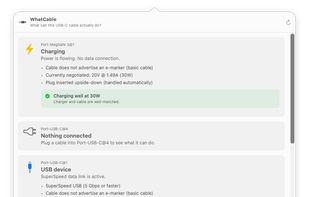
A macOS menu bar app that reads the e-marker chip inside your USB-C cables and tells you in plain English what each one can actually do. When something is charging slowly or running at reduced speed, it names the weak link.

Cost / License
- Freemium (Pay once)
- Open Source
Platforms
- Mac
- Homebrew

Features
Highlights All activities
WhatCable News & Activities
Recent activities
- Ben liked WhatCable
- darrylmorley-uk updated WhatCable
 igor_arkhipov added WhatCable as alternative to USB Status
 igor_arkhipov added WhatCable as alternative to USB Connection Information
- Wierzciu liked WhatCable
- Paul added WhatCable


Developed by
 Darryl Morley
 Licensing
Open Source and Freemium product.Pricing
One time purchase (perpetual license) that costs $10 + free version with limited functionality.Written in
Alternatives
4 alternatives listedBadge
Get an embeddable badge for WhatCableSupported Languages

AlternativeTo Categories
OS & Utilities, System & HardwareGitHub repository
- 8,899 Stars
- 271 Forks
- 29 Open Issues
- Updated

No comments or reviews, maybe you want to be first?