
WristPlay
Like
Play & view media and audio.
Cost / License
- Freemium (Subscription)
- Proprietary
Platforms
- iPhone
- Apple Watch


+1


WristPlay
Like
Features
No features, maybe you want to suggest one?
WristPlay News & Activities
Highlights All activities
Recent activities
WristPlay information
No comments or reviews, maybe you want to be first?
What is WristPlay?
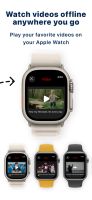
Watch your videos directly on your Apple Watch. Anywhere. Anytime.
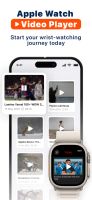
WristPlay makes it incredibly easy to send videos from your iPhone to your Apple Watch and enjoy them right on your wrist — even offline. Whether you want to watch short clips, tutorials, travel videos, or your personal media on the go, WristPlay turns your Apple Watch into a powerful mini media player.
How it works
- Add a video from URL, Files, or Photos on your iPhone.
- Send it instantly to your Apple Watch.
- Watch it offline whenever you want — no connection needed.
- Simple, fast, and designed for the Apple Watch experience.
Why WristPlay?
- Import videos easily from links, URLs, Files, and Photos
- Play your media offline with smooth performance
- Supports popular formats including MP4, MOV, M4V
- Use the built-in watch speaker or connect Bluetooth headphones
- Keep multiple videos on your watch and switch anytime
- Auto-resume from your last watched position
- Minimal, clean, easy-to-use interface designed for quick access
- Perfect for workouts, travel, study breaks, and hands-free moments
Supported Media
Video: MP4, MOV, M4V
Premium Features
Unlock the full experience with WristPlay Pro:
- Faster transfers
- Larger video storage
- Priority performance
- Upcoming advanced playback controls
- And more…