WarpFetch is a fast, native Mac download manager and file downloader for direct links, batch downloads, FTP, FTPS, and SFTP transfers.
Built for users who want more control than a basic browser download, WarpFetch helps you download files, manage queues, resume interrupted transfers, organise saved files, and work with remote servers from one clean Mac app.
WHY WARPFETCH?
• Fast download manager for Mac
• File downloader for direct URLs
• Multi-connection download acceleration for supported servers
• Batch Import for adding multiple file links at once
• Pause, resume, retry, and recovery support
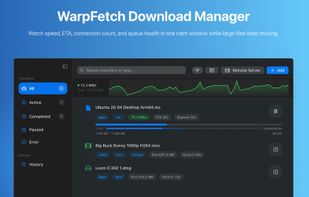
• Live speed, ETA, progress, and connection activity
• Clean download queue for active, waiting, and completed transfers
• Scheduling tools for planned downloads
• Rules, tags, and rename templates for automatic organisation
• Workspaces with custom save folders, headers, and default tags
• Transfer history stored locally on your Mac
• FTP, FTPS, and SFTP remote server support
• SFTP TOTP and keyboard-interactive authentication
• Optional browser handoff for supported direct file links
DOWNLOAD MANAGER FOR MAC
WarpFetch is designed for direct file downloads. Add a URL, choose where to save the file, and manage the transfer from one focused Mac app.
Use it for large files, repeated downloads, batch downloads, authenticated links, remote server files, and workflows where you need better visibility and control than a browser download.
FAST FILE DOWNLOADER
For supported servers, WarpFetch can use multi-connection download acceleration to split work across multiple connections and improve throughput.
You can view live download speed, ETA, progress, and connection activity while transfers are running.
BATCH DOWNLOADS AND QUEUE CONTROL
Add multiple links with Batch Import, organise downloads in a queue, and schedule transfers to run later.
WarpFetch makes it clear what is downloading, what is waiting, what is paused, and what has completed.
FTP, FTPS, AND SFTP TRANSFERS
Connect to remote servers and transfer files using:
• FTP
• FTPS
• SFTP
Browse remote folders, choose files, and manage remote downloads from the same app.
BUILT FOR ORGANISATION
WarpFetch includes tools for organised download workflows:
• Tags
• Rules
• Rename templates
• Workspaces
• Custom save folders
• Transfer history
These features help keep downloads structured instead of scattered across your Mac.
BROWSER HANDOFF
Optional browser handoff is available for supported direct file downloads from Safari and Chrome.
The Chrome extension is available separately from the Chrome Web Store.
Video and audio files are handled only when you explicitly click a supported direct file link or enable “All supported transfers” mode.
The extension respects normal browsing behaviour and does not interact with streaming content.







 Paul added WarpFetch as alternative to Xtreme Download Manager, Free Download Manager, JDownloader, DownThemAll and 47 more


No comments or reviews, maybe you want to be first?