Wakely icon
Wakely icon

Wakely

 Like

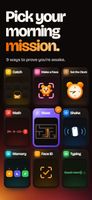
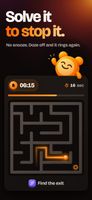
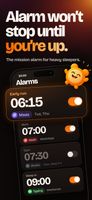
Mission alarm clock for heavy sleepers: the alarm won’t stop until you finish a wake-up mission like a maze, math or making a face.
Wakely screenshot 1
Wakely screenshot 2
+1
Wakely screenshot 3

Cost / License

  • Freemium (Subscription)
  • Proprietary

Application type

Since

  • Since 2026

Platforms

  • iPhone
0likes
0articles
Save

Features

Features

Highlights All activities

Wakely News & Activities

Recent activities

Wakely information

  • Developed by

    TR flagOnur Kusaksizoglu
  • First released

    2026
  • Licensing

    Proprietary and Freemium product.
  • Pricing

    Subscription that costs $35 per year + free version with limited functionality.
  • Alternatives

    9 alternatives listed
  • Badge

    Get an embeddable badge for Wakely
  • Supported Languages

    • English
    • Turkish
    • German
    • French
    • Spanish
    • Italian
    • Portuguese
    • Dutch
    • Polish
    • Japanese
    • Korean
    • Chinese
    • Czech
    • Hungarian
    • Romanian
    • Vietnamese
    • Indonesian
    • Finnish
    • Swedish
    • Danish
    • Norwegian Bokmål
    • Tagalog

AlternativeTo Category

OS & Utilities
Wakely was added to AlternativeTo by Onur Kuşaksızoğlu on and this page was last updated .

No comments or reviews, maybe you want to be first?

Official Links

What is Wakely?

Wakely is a mission alarm clock for iPhone, made for heavy sleepers. Instead of a snooze button, your alarm keeps ringing until you complete a short wake-up mission: Maze, Math, Catch, Shake, Memory, Typing, Face ID, Make a Face (copy the mascot’s expression on camera) or Set the Clock. You can chain up to three missions and choose Easy, Normal or Hard.

Wakely uses Apple’s system alarms, so it rings in Silent Mode and Focus and doesn’t need to stay open overnight. Wake-Up Check rings again a few minutes after you stop the alarm to make sure you’re really up. Streaks and wake-up insights, Home Screen and Lock Screen widgets. No account, no ads.