Volume Styles lets you fully customize your phone's volume panel and sliders.
Change the colors, apply different themes such as iOS & MIUI, change the position, and more! You have full control.
You can even add additional shortcuts in the volume panel, and change the brightness, to make accessing things faster.
STYLES
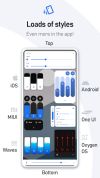
Easily apply any style to your volume slider in just one tap:
• Android 10
• iOS 13
• Xiaomi MIUI
• Samsung One UI
• OnePlus OxygenOS
• Android Oreo horizontal sliders
• Huawei EMUI
• Windows 10
• RGB
• Color OS
• Paranoid Android
• Vivo Funtouch OS
• Realme UI
• iOS 12
• Windows Phone
• Volume knob
• ... and thousands of more styles inside the app
Volume Styles also includes a custom Style Creator where you can customize things to the extreme.
When you have designed your perfect style, you can submit it to the Style Feed along with thousands of other styles created by the community.
Simply favorite a style in the Style Feed to save it for later, or apply it instantly with a single tap.
SLIDERS
Change which volume sliders are shown. You can even add a brightness slider!
• Media volume
• Ring volume
• Notification volume
• Alarm volume
• Voice call volume
• System volume
• Bluetooth volume
• Cast volume
• Brightness
CUSTOMIZE
Style the volume panel exactly how you like:
• Apply the colors you want
• Auto dark mode
• Change the corner radius
• Volume control panel position on screen
• Volume panel show duration
• ... and more!
ADD SHORTCUTS
• Live Caption
• Toggle rotation
• Flashlight / Torch
• Screenshot
• Split screen
• Settings shortcut
• Turn off screen
• Open sound settings
• Toggle Do Not Disturb
• Toggle sound mode ( silent / vibrate / ring )
• Toggle auto brightness
• Toggle media volume
• Toggle notification volume
• Toggle alarm volume
• Toggle voice call volume
• Toggle system volume










 Fla added Volume Styles as alternative to Granular Volume
 Emin added Volume Styles as alternative to NoVolume and 32steps

 Tom Bayley

No comments or reviews, maybe you want to be first?