vNetMap is a hosted, zero-knowledge end-to-end encrypted network visualization platform. It automates network discovery and topology mapping using a lightweight local agent, without exposing your infrastructure data to the cloud.
✨ Key Features
Automated Discovery: A lightweight Docker agent scans your local subnets, probes ports, and syncs devices automatically on your schedule. Manual renames are permanently preserved.
Interactive Topology Mapping: Visually map physical switch ports, dynamic wireless links, and nested devices (e.g., clients behind an AP) in real-time.
Multi-Workspace Organization: Group infrastructure by client, site, or environment with role-based access control. Ideal for MSPs and IT teams managing multiple networks.
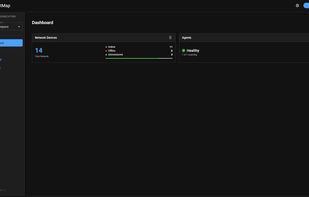
Live Status Monitoring: See immediately if critical devices or discovery agents drop offline based on their last check-in.
🔒 Strict Zero-Knowledge Architecture
Security is the core of vNetMap. It is built to manage enterprise networks without compromising data privacy:
True End-to-End Encryption: All sensitive data (IPs, MACs, hostnames, port configurations) is encrypted locally in your browser or by the agent using AES-GCM.
Blind Backend: The server only receives and stores encrypted blobs. We physically cannot read your network topologies or device data.
Client-Side Keys: Your password never leaves your device and is only used to derive your local encryption keys. A secure Recovery Key ensures you never lose access to your data.





 EU
EU


 vNetMap


No comments or reviews, maybe you want to be first?