
VMLite VNC Server icon

VMLite VNC Server

A VNC server for Android WITHOUT ROOT requirements.

(not to be confused with the desktop-on-mobile client VMLite).

VMLite VNC Server allows you to remotely view and control your android phone or tablet from a desktop computer or from another mobile device using the popular VNC.
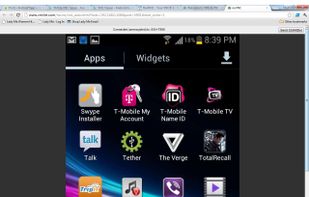
VMLite server being accessed via a web browser.

Cost / License

  • Paid
  • Proprietary

Application type

Alerts

  • Discontinued

Platforms

  • Windows
  • Android
Discontinued

The app is not available on the Play Store anymore.

2likes
0articles
Save

Features

No features, maybe you want to suggest one?

Highlights All activities

VMLite VNC Server News & Activities

Recent activities

No activities found.

VMLite VNC Server information

AlternativeTo Categories

Network & Admin, Remote Work & Education
VMLite VNC Server was added to AlternativeTo by elderberrie on and this page was last updated .

No comments or reviews, maybe you want to be first?

Featured in Lists

BlackHatM4tchM4K3r

A list with 12 apps by jamesncox88 without a description.

By BlackHat Ginger12 appsUpdated

What is VMLite VNC Server?

A VNC server for Android WITHOUT ROOT requirements.

(not to be confused with the desktop-on-mobile client VMLite).

VMLite VNC Server allows you to remotely view and control your android phone or tablet from a desktop computer or from another mobile device using the popular VNC protocol.

This app works on rooted and non-rooted android devices. However, for non-rooted devices, every time after you reboot, you will have to connect your device to a Windows PC or Mac using a USB cable, then run a free desktop program, VMLite Android App Controller, to start the server on your device. Once the server is started, you can disconnect your device.

FEATURES:

  • no need to root your android devices
  • works on API level 7 and above, including Eclair, Froyo, Gingerbread, ICS and Jelly Beans.
  • supports ARM and X86 devices.
  • supports typical VNC clients, TightVNC, Real VNC, etc.
  • supports Java enabled browsers. You can connect to the android device from a browser using a Java applet
  • supports HTML5 compatible browsers, you can connect to your android device without any other installations
  • supports reverse connections to vnc viewers running in listening modes
  • supports VNC password
  • supports scale and rotation
  • two-way clipboard support (text only)
  • full mouse and keyboard control
  • supports special keys, such as Home, Back, Menu, Search, Power, etc.
  • supports long press keys, e.g., you can press and hold the search key
  • supports mouse wheel
  • supports swipe/fling gestures
  • auto turn on screen when you press any key from VNC client