

VivySub icon
VivySub icon

VivySub

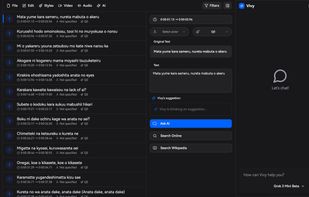
Empowering subtitle creators with next-generation editing tools designed for the modern world of content creation.
VivySub screenshot 1

Cost / License

  • Freemium (Subscription)
  • Proprietary

Platforms

  • Mac
  • Windows
  • Linux
  • Online
0likes
0comments
0articles

Features

  1.  Ad-free
  2.  Real time collaboration
  3.  Dark Mode
  4.  Live Preview
  5.  Srt
  6.  Support for Keyboard Shortcuts
  7.  AI-Powered
  8.  AI-Translation

VivySub News & Activities

Highlights All activities

Recent activities

VivySub information

  • Developed by

    HK flagVivy Technologies
  • Licensing

    Proprietary and Freemium product.
  • Pricing

    Subscription ranging between $8 and $10 per month + free version with limited functionality.
  • Alternatives

    49 alternatives listed
  • Supported Languages

    • English

AlternativeTo Categories

Audio & MusicVideo & Movies
VivySub was added to AlternativeTo by Paul on and this page was last updated .
No comments or reviews, maybe you want to be first?

What is VivySub?

Empowering subtitle creators with next-generation editing tools designed for the modern world of content creation.

  • AI-powered features: Advanced AI capabilities powered by state-of-the-art language models and specialized transcription engines for professional subtitle creation.
  • Lightning-fast performance: Powered by Rust engine for zero-lag editing of massive subtitle files with real-time preview and instant rendering.
  • Real-time collaboration: Co-edit with your team, track version history, and leave inline comments for seamless teamwork.
  • Cross-platform access: Available on web and desktop. Mobile apps coming soon. Edit your subtitles anywhere, anytime.
  • Intuitive workflow: Streamlined interface designed for subtitle professionals with keyboard shortcuts and smart tools.
  • Extensions support: Extend functionality with custom plugins and community-built extensions for specialized workflows.
  • Cloud sync across devices: Seamlessly sync your projects, settings, and preferences across all your devices. Start editing on desktop, continue on mobile, and access your work from anywhere with automatic cloud backup and real-time synchronization.

Official Links