

Vireo Mail
Like
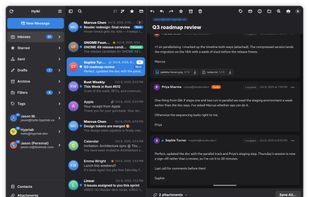
Vireo is a clean, fast, GNOME-native email client with a calm three-pane layout, unified inbox, and support for OAuth accounts. Fast to open, effortless to read, and private by default.
Features
Properties
- Lightweight
Features
- Dark Mode
- Multiple Account support
- Ad-free
- No Tracking
- Unified inbox
Gravatar integration
- Attachments
- Inbox Management
Tags
Vireo Mail News & Activities
Highlights All activities
Recent activities
- SudoVanilla added Vireo Mail
- POX updated Vireo Mail
- SudoVanilla added Vireo Mail as alternative to K-9 Mail, Claws Mail, Evolution and Betterbird
Vireo Mail information
No comments or reviews, maybe you want to be first?
What is Vireo Mail?
Vireo is a desktop email client for Wayland that feels at home in GNOME. It talks IMAP/SMTP directly, keeps your mail and credentials on your machine, and blocks trackers by default — no telemetry, no analytics.
Features
- Multiple accounts — IMAP and POP3, each on its own background worker, with a unified All Inboxes view.
- OAuth 2.0 sign-in — Google, Microsoft and custom providers over XOAUTH2, plus import from GNOME Online Accounts.
- Whole-mailbox sync & search — no message-count cap; a fast first page loads instantly, the rest indexes in the background with infinite scroll.
- Two-way sync — deletions and moves from your phone or another client sync back automatically (IMAP IDLE + reconciliation).
- Conversation threading, compose/reply/forward with HTML signatures, editable drafts, and full folder management.
- Outbox — a send that fails is kept and retried when the connection returns, not lost; queued messages can be edited, sent by hand or discarded.
- Message previews — the first one to three lines of each message under its subject in the list (or off).
- Single-key shortcuts — Gmail-style j/k, r, a, d and friends, without a modifier (see below).
- Printing — print a message with its sender, recipients and date, with an in-app preview that also saves straight to PDF.
- Runs in the background (optional) — closing the window keeps mail arriving; Vireo appears under Background Apps in the GNOME system menu, and can start at login without opening a window.
- Privacy-first reading — remote content blocked by default, per-sender allow/block lists, and a per-message light/dark content theme.
- GNOME-native — adaptive three-pane layout, per-account colours and emoji avatars, light/dark following the system, optional GNOME Contacts.