
Video Speed Controller Extension icon

Video Speed Controller Extension

Watch lectures, tutorials and reviews in less time. This extension puts a row of speed buttons right under the player on YouTube, RuTube, Dzen and VK Video: one click and a slow talk moves at twice the pace, one more click brings it back to normal.
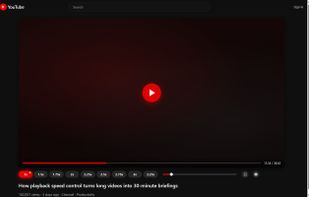
Video Speed Controller Extension screenshot 1

Cost / License

Platforms

  • Google Chrome
  • Mozilla Firefox
0likes
0comments
0articles

Features

  1.  Keyboard Shortcuts

Video Speed Controller Extension News & Activities

Highlights All activities

Recent activities

Video Speed Controller Extension information

  • Developed by

    MaxScorpy
  • Licensing

    Open Source (GPL-3.0) and Free product.
  • Written in

  • Alternatives

    6 alternatives listed
  • Supported Languages

    • English
    • Russian

AlternativeTo Category

OS & Utilities

GitHub repository

  •  1 Stars
  •  0 Forks
  •  10 Open Issues
  •   Updated  
View on GitHub
Video Speed Controller Extension was added to AlternativeTo by dansc on and this page was last updated .
No comments or reviews, maybe you want to be first?

What is Video Speed Controller Extension?

Watch lectures, tutorials and reviews in less time. This extension puts a row of speed buttons right under the player on YouTube, RuTube, Dzen and VK Video: one click and a slow talk moves at twice the pace, one more click brings it back to normal.

Speed buttons under the video. Out of the box they run from 1x to 3.25x on YouTube and to 3x on the other sites. Which buttons you see is up to you — pick them in the settings from a range that goes from 0.5x to 4x.

A slider for anything in between, with the exact rate shown above the handle as you drag. It stops at your fastest button by default; raise its ceiling to 10x in the settings if you want more.

One click sets the speed for the video you are watching. A double click makes it the speed every new video starts at — the saved button is marked with a dot in the corner.

Keyboard shortcuts, several combinations per action if you like, so a remote and a keyboard can both do the job. Rebind them and set the step in the settings.

YouTube Shorts get a remembered speed of their own, so 2x from ordinary videos does not leak into them.

Dzen and VK Video are opt-in. Nothing is requested when you install: open a video there, click the icon and allow it once. On VK the extension only ever runs in the video section.

Video sites redesign without warning, and a panel pinned to one spot disappears the moment they do. This one looks for the player five different ways in turn and re-attaches itself wherever it turns up. The check runs continuously, so there is nothing for you to fix by hand.

Your settings stay in your own browser. The extension collects no statistics, tracks nothing you watch and sends nothing anywhere. The source code is open under GPL-3.0-or-later, so any of this can be checked.

The interface is English and Russian, following your browser on first run and switchable from the menu at any time.

Official Links