Your video library, finally visible.
Stop opening videos one by one just to find out what's in them.
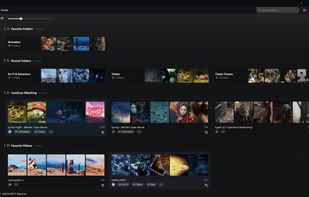
Video Peek turns any folder of videos into a visual gallery you can browse at a glance — smart filmstrips of each video's best moments, animated previews when you hover, and a built-in player that starts playing exactly where you clicked. Built natively for Windows, it's fast from the first click — even in folders packed with hundreds of videos.
WHY YOU'LL LIKE IT
• Browse right now, not later — videos appear instantly, previews fill in moments later. No import screens. No waiting.
• Hover to preview — cards come alive with animated playback right in the grid.
• Click any filmstrip frame to start playing from that exact moment.
• Search as fast as you type, across your whole library.
• Clean, minimal, modern interface — no clutter, nothing dated.
A VISUAL BROWSER FOR YOUR VIDEOS
• Every video becomes a filmstrip of its most distinct moments. The grid adapts to your window and layout preferences — a few large cards or a dense wall of dozens.
• Smart thumbnails: frames are chosen for sharpness and variety, so each filmstrip captures genuinely different moments — not five near-identical frames. Face-aware, too.
• Folder cards with preview thumbnails and video counts — dive into subfolders and back without losing your place.
• A Home screen with recent folders, favorites, and your bookmarked moments.
A PLAYER BUILT FOR FINDING MOMENTS
• Sharp, smooth playback — even for big 4K files.
• Live animated seek preview — a miniature video plays as you scrub the timeline. Not static thumbnails.
• Moment strip: your video distilled to its highlights — one click to jump between them.
• Bookmark any moment. Favorites from across your library gather on your Home screen.
• Capture the current frame as an image in one click.
ORGANIZE WITHOUT FRICTION
• Tags with custom categories — apply to one video or many at once with multi-select.
• Five-color tagging system for quick visual triage.
• Bookmarks for videos, folders, and individual moments.
• Rename, move, copy, and delete right from the grid — one file or a whole selection.
• File details at a glance: resolution, duration, size, and more.
FIND ANYTHING, FAST
• Instant search by filename or tag, with live suggestions and per-tag counts.
• Search within a folder and everything inside it.
• Watched folders: pick the ones you care about and Video Peek quietly keeps them up to date — new videos show up, previewed and searchable, all on their own. Your bookmarked folders are watched automatically.
EXPORT & SHARE
• Cut sheets: stitch a video's moments grid into a single tidy image, with optional header and timestamps.
• Export frames individually, per video, or a whole folder at once.
FAST WHERE IT COUNTS
• Previews appear almost instantly — even in folders with hundreds of videos.
• Scroll, search, and play without stutters.








 shinichinomura added Video Peek as alternative to SceneStrip
 StippieDot added Video Peek as alternative to VideoCull
 killin added Video Peek as alternative to Slice2Storyboard


Comments and Reviews
Site is down. Softpedia still has a link.
https://www.softpedia.com/get/Multimedia/Video/Other-VIDEO-Tools/Video-Peek.shtml