





VectorRaptor
1 like
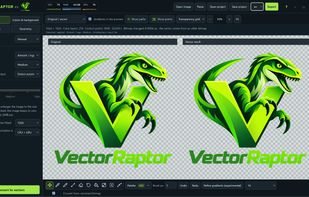
VectorRaptor is a Windows app that converts raster images (PNG, JPG, WEBP, BMP, TIFF) into editable vectors, keeping flat colours, gradients and soft edges with a low node count. Export to SVG, PDF, AI, EPS, PSD and PNG. Images never leave your computer.

 EU


Features
Highlights All activities
VectorRaptor News & Activities
Recent activities
 Fla added VectorRaptor as alternative to Homotope
 Fla added VectorRaptor as alternative to VectorEasy
 onuraki added VectorRaptor as alternative to SVGized
- Przemysław Maciejkiewicz A comment was removed from VectorRaptor
- Przemysław Maciejkiewicz updated VectorRaptor
- Przemysław Maciejkiewicz liked VectorRaptor
- Przemysław Maciejkiewicz A comment was removed from VectorRaptor
- Przemysław Maciejkiewicz updated VectorRaptor
- Przemysław Maciejkiewicz A comment was removed from VectorRaptor
- Przemysław Maciejkiewicz updated VectorRaptor

Developed by
 WAVEStudio Przemysław Maciejkiewicz
Licensing
Proprietary and Commercial product.Pricing
Subscription that costs $10 per month.Alternatives
30 alternatives listedBadge
Get an embeddable badge for VectorRaptorSupported Languages




No comments or reviews, maybe you want to be first?