VectorFox is a native Mac app for turning raster images into clean, scalable SVG graphics.
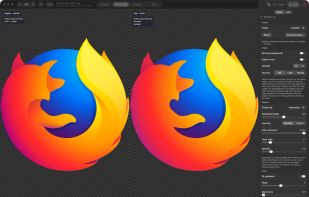
It fits real linear and radial gradients to your pixels, with a live preview, presets for logos, illustration, and AI-generated art, and a built-in SVG optimizer. Compare the original and vector side by side, remove backgrounds before tracing, and export files for editing or cutting.
Key features
• Raster to SVG — Convert PNG, JPEG, GIF, WebP, HEIC, BMP, and TIFF into scalable vector graphics.
• Real SVG gradients — Fit linear and radial gradients to the original pixels to preserve smooth shading.
• Live preview — See the vector result update as you adjust tracing settings.
• Visual comparison — Compare the original and SVG side by side with synchronized zoom and pan.
• Artwork presets — Choose presets for logos, illustration, AI art, clean color bands, and cutouts.
• SVG optimization — Reduce SVG file sizes with the built-in Rust-powered optimizer.
• Batch conversion — Convert multiple images at once, with up to eight in parallel with Pro.
• Background removal — Clear flat backgrounds and enclosed gaps, or isolate a subject before tracing.
• Export profiles — Export outlines for laser and vinyl cutters, cut files, or layered SVGs for editing with Pro.
• Local processing — Trace and optimize entirely on your Mac, with native Apple Silicon and Intel support.
Everything runs locally on Apple Silicon and Intel Macs with macOS 14 or later. Includes a 14-day full-feature trial, then unlimited Balanced conversions for free; a one-time $9.99 Pro license unlocks the rest and covers three Macs.






 Andy-Miller added VectorFox as alternative to Vector Magic, VTracer, Vectorizer.AI and Super Vectorizer Pro
 Skulkworks

No comments or reviews, maybe you want to be first?