UwDiff compares two files or two folders and shows what changed. It comes as a GUI (UwDiff) and a CLI (uvd) that share one comparison engine, on Windows (x64, ARM64), macOS (Apple Silicon, Intel) and Linux (x86_64, aarch64). No separate .NET install is needed.
Four ways to compare:
- Text: order-preserving diff, written as a unified diff (diff -u), so patch can apply it. Side-by-side view with Previous/Next change.
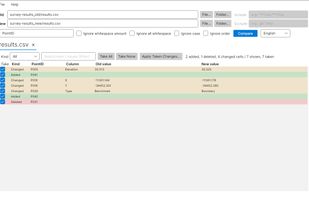
- Tables: CSV, TSV and Excel matched by key columns (e.g. an ID). Row order does not matter; you get one row per changed cell (added / deleted / changed), and you can tick the changes you want and apply them to the old file.
- Order-independent lines: counts which lines were added or removed, ignoring order.
- Folder vs folder: only-in-old, only-in-new, different and same, down through subfolders, with include/exclude patterns. Double-click a different file to see its diff.
What it reads: plain text, the content of gz, bz2, xz, lzma, zst, lz4 and br files (one side may be compressed and the other not), and the text of Word (.docx), Excel (.xlsx) and PDF. Encodings are detected automatically: UTF-8, Shift-JIS (CP932), EUC-JP and UTF-16, and the old and new files may use different ones.
Built for large inputs: files of 10 GB and more, folders with thousands of files. When memory runs short it spills to temporary files instead of failing.
Measured, with conditions (MacBook Air M4, 32 GB, macOS 26, same data and same disk for every tool, cache cleared before each run): matching two 10 GB CSV files by key took 20 to 23 s; qsv diff took 33 s with rows in the same order and did not finish within 600 s with shuffled rows; DuckDB SQL took 124 to 358 s. Comparing two 10 GB text files took 21 s, against 151 s for GNU diff and 289 s for the diff that ships with macOS. The full tables, including the cases that are close, are on the benchmarks page.
The CLI is meant for scripts: exit codes follow diff (0 same / 1 different / 2 error), -o writes the diff or a CSV of changes, -json writes a summary, and -open shows the result in the GUI without comparing again. The GUI is available in English and Japanese; the CLI messages are in Japanese.
Install: Homebrew (brew install --cask amru195704/uwview/uwdiff), Scoop (scoop bucket add uwview https://github.com/amru195704/scoop-uwview, then scoop install uwdiff) or Snap (snap install uwdiff), or download from GitHub Releases.
License: free for internal use by individuals and companies, under the UwDiff License (PolyForm Internal Use 1.0.0 plus a permission to redistribute the official binaries as packages). Redistribution in a product or service needs a separate license. It is not open-source software. UwDiff is the sister tool of UwView (a viewer for huge files) but a separate product.






 amru195704 added UwDiff as alternative to Diffchecker, Diffinity, DiffMerge, Araxis Merge and 6 more
 amru195704 added UwDiff as alternative to WinMerge, Beyond Compare, Meld, KDiff3 and 2 more


No comments or reviews, maybe you want to be first?