Apps tagged with 'Huge Files'

All apps in Apps tagged with 'Huge Files' category. Use the filters below to narrow down your search. 
Copy a direct link to this comment to your clipboard
  1. UwView icon
     2 likes

    Search huge logs at ripgrep speed, open them as fast as klogg: (plain text, 7 compressed formats, docx, xlsx, pdf) × (CLI, GUI) × (UTF-8, Shift-JIS, EUC-JP, UTF-16) × (many files, huge files). Verified up to 258 GB.

    Cost / License

    • Freemium (Pay once or Subscription)
    • Proprietary

    Application type

    Since

    • Since 2026

    Platforms

    • Windows
    • Mac
    • Linux
    • Online
    • JP flagJapan
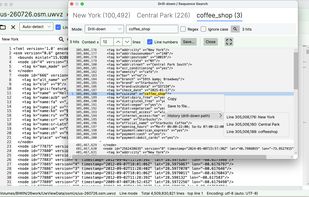
    Drill-down search (Pro): New York (100,492) ? Central Park (226) ? coffee_shop (3). Two refinements narrow 100k hits down to a single node — a Starbucks at Central Park South, with opening hours and coordinates in the raw tags. The right-click History menu shows the exact path, line numbers included.
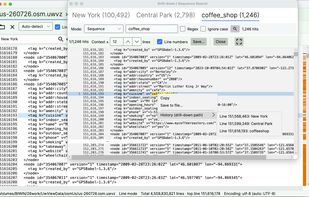
    Sequence search (Pro): the same three terms searched in order of appearance instead — 1,246 chains, each linking hits thousands of lines apart (see the History menu: line 151,568,463 ? 151,599,349 ? 151,616,193). On a log file, this is how you trace "deploy ? timeout ? ERROR" however far apart they are.
    The same 3.16 GB / 100M-line OpenStreetMap file, opened twice: native desktop (left) and the browser WebAssembly build (right, on localhost). Searching ?? returns an identical 6,204 matches in both, with ±1 line of context. The browser build is functionally the same; only indexing and search are slower, being CPU-bound. Free edition.
    +2
    The colour highlighter, with the bundled Web access (HTTP) preset loaded: regex rules colour status codes, IP addresses and syslog severities. Per rule you set regex, case, whole-line and text/background colours; order decides priority. Rule sets export and import as files, so a team can share one. 100M-line file, Japanese UI. Free edition.
    22 alternatives
  2. UwDiff icon
     Like

    UwDiff compares two files or two folders and shows what changed. It comes as a GUI (UwDiff) and a CLI (uvd) that share one comparison engine, on Windows (x64, ARM64), macOS (Apple Silicon, Intel) and Linux (x86_64, aarch64). No separate .NET install is needed.

    Cost / License

    • Free
    • Source Available

    Application type

    Since

    • New

    Platforms

    • Windows
    • Mac
    • Linux
    Comparing two CSV files by a key column (PointID). Rows are in a different order, yet only the changed cells, added rows and deleted rows are listed.
    Side-by-side text diff with changed characters highlighted. Previous/Next jumps between changes.
    Folder vs folder: files that are only in one folder or that differ are listed. Double-click a row to open its diff.
    +3
    Two Word (.docx) files compared by their text, without converting them first.
    16 alternatives