





USBridge
5 likes
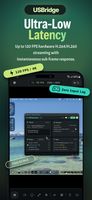
USBridge Remote bridges the gap between traditional software-based remote desktops and hardware-based KVM control, all within a single, unified, open-source interface. Whether you need to fix a server's BIOS or play games remotely without lag, this is the tool to handle it...



+3


Cost / License
- Free
- Open Source (GPL-3.0)
Application type
 EU
EUPlatforms
- Mac
- Windows
- Linux
- Online
- Android
- iPhone
- Android Tablet
- Google Chrome
- Mozilla Firefox

Features
Highlights All activities
USBridge News & Activities
Recent activities
It works quickly. A unique feature is the ability to choose between different protocols. I recommend it.
- Marina-Fedchenco liked USBridge
- Sithu A liked USBridge
- Amir Fatkulin liked USBridge
- kiykomi liked USBridge
- Amir Fatkulin A comment was removed from USBridge
- user-6036 A comment was removed from USBridge
- user-6036 liked USBridge
- Paul updated USBridge
- Amir Fatkulin updated USBridge
Developed by
 USBridge
 Licensing
Open Source (GPL-3.0) and Free product.Written in
Alternatives
35 alternatives listedBadge
Get an embeddable badge for USBridgeSupported Languages

AlternativeTo Categories
Security & Privacy, Network & Admin, Remote Work & EducationApple AppStore
- Updated
- 0 avg rating
GitHub repository
- 659 Stars
- 40 Forks
- 3 Open Issues
- Updated




Comments and Reviews
It works quickly. A unique feature is the ability to choose between different protocols. I recommend it.