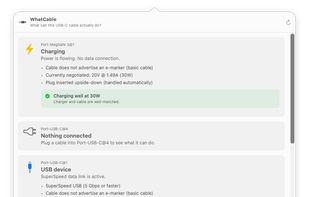
A small macOS menu bar app that tells you, in plain English, what each USB-C cable plugged into your Mac can actually do, and why your Mac might be charging slowly.
Cost / License
- Free
- Open Source
Platforms
- Mac
- Homebrew

USB Connection Information is described as 'The powerful menu bar utility that gives you a live, detailed view of your USB devices and power source' and is an app in the os & utilities category. There are six alternatives to USB Connection Information for Mac, Homebrew, Windows and Linux. The best USB Connection Information alternative is WhatCable, which is both free and Open Source. Other great apps like USB Connection Information are Connection Information Center, MenuBarUSB, DriveInfo and ViewPorts.
A small macOS menu bar app that tells you, in plain English, what each USB-C cable plugged into your Mac can actually do, and why your Mac might be charging slowly.


DriveInfo displays Drive indicators & space information on the desktop with many handy features


A macOS menu bar utility that maps every port, device, and power draw on your Mac. Live topology, hub and daisy-chain support, and link speeds — all local, no telemetry.

Native macOS tool offering real-time USB and Thunderbolt diagnostics, device power draw, connection types, storage info, and vendor data in the menu bar. Instantly view, search, pin, and rename connected devices, with a clutter-free, always-available workflow.