Unlock my PDF is a private PDF utility for iPhone and iPad. Version 2.0 adds a redesigned interface and 20+ PDF tools. Everything runs on your device with Apple technologies: no uploads, no account, and results never get a watermark.
Unlock and protect
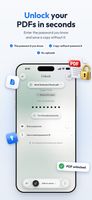
• Unlock — type the password you already know and save a copy without it
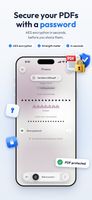
• Protect — add a password with AES encryption before you share a file
• Save your passwords with Face ID and unlock or protect several PDFs at once (Premium)
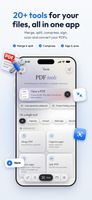
20+ PDF tools
• Merge PDFs, split them, extract pages
• Organize pages: reorder, rotate, delete, crop margins
• Compress PDFs for email and uploads
• Scan paper documents and turn photos into PDF
• PDF to JPG/PNG and PDF to text
• Sign with your finger, fill in forms, add text or images
• Watermark, page numbers, redact, permissions, remove metadata, flatten and OCR (Premium)
Open PDFs from Files (iCloud Drive, Dropbox, OneDrive and more), a camera scan, Photos, or straight from Mail and other apps through the Share sheet.
Only passwords you know: Unlock my PDF is not a password recovery or cracking tool. It removes a password only when you type it or pick one you saved yourself; PDFs whose password you don't know stay closed.
Free and Premium: the free version includes 3 unlocks and 3 protections a day, plus one tool a day after a short video, with ads. Premium (monthly or yearly subscription, with a 3-day free trial on the yearly plan) removes the limits and the ads.
Available in English, Italian, German, Spanish, French, Japanese, Portuguese (Brazil), Russian and Chinese (Simplified).







 EU
EU


 Giulio Palumbo Schiavone


No comments or reviews, maybe you want to be first?