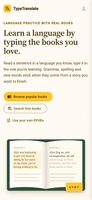
TypeTranslate turns classic books into language practice. You read a sentence in a language you know, then type the same sentence in the language you're learning. Grammar, spelling and vocabulary go in through your fingers, in the context of a story you actually want to read.
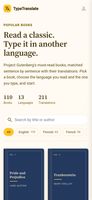
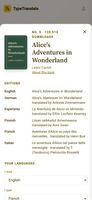
110 classics. Pride and Prejudice, Frankenstein, Alice in Wonderland, Don Quixote, The Metamorphosis, Crime and Punishment and more come in 13 languages. Each translation was matched to the original sentence by sentence with a multilingual language model, so the line you read is the line you type. The catalog is strongest for English, Finnish, French, German and Dutch, and Spanish, Italian, Esperanto and others are also included.
Any book you like. Search free public-domain libraries (Project Gutenberg, Wikisource, Wolne Lektury, Litteraturbanken and more) from inside the app. Or upload any two EPUB files, a book and its translation, and pick where each one starts.
Built for learning, not just typing:
- Mistakes show up as you type. Accents count, but upper and lower case don't.
- Click any word to see its translation in the context of the whole sentence.
- Long sentences are split into short pieces, so you never lose your place.
- View one line, one sentence or a whole paragraph at a time.
- Skip a line or go back one, and swipe on your phone.
- Words per minute, accuracy and your history are tracked over time.
Free, no sign-up needed. Start typing straight away in your browser, on desktop or phone. Sign in with Google to save your progress and continue on any device. You can install it as an app, and books you've opened work offline.
Read in one language. Type in another.








 vivekgpt added TypeTranslate as alternative to NinjaType
 jj_kurwa added TypeTranslate as alternative to Monkeytype


No comments or reviews, maybe you want to be first?