Two Plates icon
Two Plates icon

Two Plates

Two Plates is a strength training log for iPhone and Apple Watch that you buy once. There's no subscription and no account.
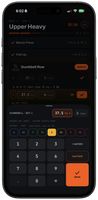
Logging a set, with RPE on the keypad
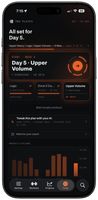
Home, with the next workout and recent volume
+3
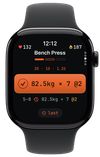
Confirming the next set on Apple Watch

Cost / License

  • Freemium (Pay once)
  • Proprietary

Platforms

  • iPhone
  • Apple Watch
0likes
0articles
Save

Features

Properties

Features

Highlights All activities

Two Plates News & Activities

Recent activities

Two Plates information

  • Developed by

    AU flagAnthony Topalides
  • Licensing

    Proprietary and Freemium product.
  • Pricing

    One time purchase (perpetual license) that costs $25 + free version with limited functionality.
  • Alternatives

    5 alternatives listed
  • Badge

    Get an embeddable badge for Two Plates
  • Supported Languages

    • English

AlternativeTo Category

Sport & Health
Two Plates was added to AlternativeTo by toppa_33 on and this page was last updated .

No comments or reviews, maybe you want to be first?

Official Links

What is Two Plates?

Two Plates is a strength training log for iPhone and Apple Watch that you buy once. There's no subscription and no account.
Logging is free, with no set limits and the Watch app included. The next set is already filled in, so logging it is one tap, with RPE or RIR right on the keypad. You can run a whole session from the Watch without touching your phone, and plate maths is worked out per side for the bar and plates you own.

A one-off purchase unlocks the programs. 5/3/1, GZCLP, nSuns and others are built in with their progression rules, so the app works out next week's weights and shows why after each set. You can also bring your own AI. Two Plates writes the prompt for ChatGPT, Claude or whichever AI you use, you paste the plan back, check every line, and it runs like a built-in program. A weekly check-in prompt carries your numbers and notes back to the same AI so it can coach you off what you actually lifted.

Your data stays on your phone and in your own iCloud. Import your history from Strong or Hevy by CSV, and export everything any time.

Made by a solo developer in Melbourne.