Tweedia Studio Alternatives

Tweedia Studio is described as 'Web-based timelapse editor for long shoots — turn weeks of photos or camera footage into a smooth, flicker-free timelapse without Lightroom' and is an website in the photos & graphics category. There are more than 10 alternatives to Tweedia Studio, not only websites but also apps for a variety of platforms, including Mac, Windows, iPad, Adobe Photoshop Lightroom Classic and Adobe After Effects apps. The best Tweedia Studio alternative is LRTimelapse. It's not free, so if you're looking for a free alternative, you could try Panolapse or Time-Lapse Tool. Other great sites and apps similar to Tweedia Studio are Sequence, FrameByFrame, Timelapse Workflow and GBDeflicker.

Copy a direct link to this comment to your clipboard
Tweedia Studio alternatives page was last updated

Alternatives list

  1. LRTimelapse icon
     2 likes

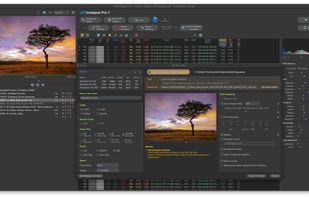
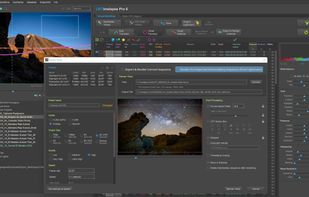
    Facilitates advanced time-lapse editing with XMP workflow integration, keyframing, visual deflicker, and smooth exposure transitions, offering batch export, holy grail support, RAW compatibility, preview options, high-resolution output, and animation curves.

    15 LRTimelapse alternatives

    Cost / License

    • Paid
    • Proprietary

    Platforms

    • Mac
    • Windows
    • Adobe Photoshop Lightroom Classic
    • Adobe After Effects
     
  2. Panolapse icon
     2 likes

    Add camera motion to your timelapse videos, deflicker, and combine JPG images into a video file. Panolapse uses 3D perspective correction to create real-world rotational panning through your scene.

    Cost / License

    • Freemium
    • Proprietary

    Platforms

    • Mac
    • Windows
     
  3. Time-Lapse Tool allows to make a time-lapse video in just few clicks. A massive variety of effects makes it uniquely easy to make nice movies. Program allows to experiment with different frame rates, emulate camera moves and zooms.

    Cost / License

    • Freemium
    • Proprietary

    Platforms

    • Windows
     
  4. Sequence icon
     2 likes

    Sequence is the ultimate tool for time lapse photographers. Painlessly assemble time lapse movies from your photos, deflicker and adjust the white balance using keyframes.

    Cost / License

    • Paid
    • Proprietary

    Alerts

    • Discontinued

    Platforms

    • Mac
     
  5. FrameByFrame icon
     1 like

    Download FrameByFrame for free. Stop-motion movie production software for OS X. FrameByFrame enables you to create QuickTime movies from pictures taken with any camera/webcam connected to your Mac, including built-in iSight cameras.

    Cost / License

    • Free
    • Proprietary

    Alerts

    • Discontinued

    Platforms

    • Mac
     
  6. Turn Adobe Photoshop Lightroom into a powerful time-lapse editor. The Timelapse Workflow plugin is a suite of four essential tools for time-lapse post-processing in Lightroom.

    Cost / License

    • Paid
    • Proprietary

    Platforms

    • Mac
    • Windows
     
  7. Remove video flicker in time-lapse: Adobe Plugin or Windows Application

    Flickering is a common problem in time-lapse or stop motion footage captured using a digital still camera. Frame by frame variations in lighting or in exposure lead to perceptible brightness fluctuations, or.

    Cost / License

    • Paid
    • Proprietary

    Platforms

    • Mac
    • Windows
     
  8. iStopMotion is an award-winning software for stop motion animation and time lapse photography, available for macOS desktops and iPad.

    Cost / License

    • Paid
    • Proprietary

    Platforms

    • Mac
    • iPad
     
  9. The VirtualDub MSU Deflicker filter is intended for processing video with flicker effect (fast and abrupt brightness changes). The effect of flicker is a common degradation in old movies and time-lapse photography.

    Cost / License

    • Free
    • Open Source

    Platforms

    • Windows
    • VirtualDub
     
  10. Zeitrfaffer a time-lapse movie creator for Mac. It is a simple tool for creating a time-lapse movie from multiple images. Just select a directory containing image files (JPEG, TIFF, PNG, BMP or RAW), and press Export button to make a movie.

    Cost / License

    • Paid
    • Proprietary

    Platforms

    • Mac
     
10 of 10 Tweedia Studio alternatives