Support Us

Help Keep AlternativeTo Free

With less and less ad revenue, we depend on donations to cover our costs. If AlternativeTo has saved you time, consider giving something back.

Tube Getter icon
Tube Getter icon

Tube Getter

Tube Getter is a Python application that allows you to download videos and audio from YouTube. It provides a simple user interface built with customtkinter and uses the pytubefix library for downloading the YouTube content.
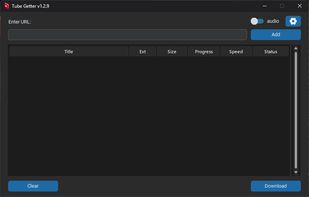
v1.2.9 screenshot

Cost / License

  • Free
  • Open Source (MIT)

Platforms

  • Windows
1like
0comments
0articles

Features

Properties

  1.  Lightweight

Features

  1.  Portable
  2.  Dark Mode
  3.  No Tracking
  4.  Ad-free
  5.  MP3 Downloader
  6.  No registration required
  7.  YouTube Downloader
  8.  Video Download

Tube Getter News & Activities

Highlights All activities

Recent activities

Tube Getter information

  • Developed by

    paichiwo
  • Licensing

    Open Source (MIT) and Free product.
  • Written in

  • Alternatives

    40 alternatives listed
  • Supported Languages

    • English

AlternativeTo Categories

Video & MoviesAudio & Music

GitHub repository

  •  5 Stars
  •  1 Forks
  •  0 Open Issues
  •   Updated  
View on GitHub
Tube Getter was added to AlternativeTo by Paichiwo on and this page was last updated .
No comments or reviews, maybe you want to be first?

What is Tube Getter?

Tube Getter is a Python application that allows you to download videos and audio from YouTube. It provides a simple user interface built with customtkinter and uses the pytubefix library for downloading the YouTube content.

Features: -Download video and audio from YouTube. -Support for downloading individual videos or entire playlists. -Choose the output format (video or audio). -Monitor the download progress, including progress, download speed, and completion status. -Choose the download folder in the settings window

WINDOWS: Download tube_getter.exe from https://github.com/paichiwo/tube-getter/releases/tag/v1.2.9 Run the application. Note 1: Application is portable, no installation required.

Note 2: Your antivirus software might find this application suspicious. This is due to the nature of pyinstaller behavior. It's a common problem and well acknowledged. Exemption might have to be added in windows defender or other antivirus software that you use.

Usage: -Run the application, the window will appear. -Enter the YouTube video URL or playlist URL in the input field and click "Add" or press Enter, you can also add URLs one by one. -Choose Audio or Video to update the relevant information about the YouTube stream. -Select the download folder by clicking the "Settings" button. -The table will display the list of queued video or audio streams. -Click the "Download" button to start the download process and monitor the download progress in the table. Completed downloads will show the status as “Complete.”