NTFS read & write for macOS. No kernel extension. Free and open source.
Mount NTFS disks and volumes in Finder — read and write — without lowering your Mac’s security or rebooting. Built on Apple’s FSKit, so it runs in user space like a normal app. Free and open source, GPL-2.0, and verified against Windows itself.
The first of its kind
Until now, writing to NTFS on a Mac meant one of two things: pay for a driver that loads a kernel extension — which on Apple Silicon requires you to put the whole machine into Reduced Security and reboot — or run an open-source FUSE stack that needs a kernel extension of its own. Apple’s built-in driver reads NTFS but has not written to it since Ventura.
TT NTFS Native is the first NTFS read/write driver for macOS that is free, open source, and needs no kernel extension at all. It is built on FSKit, Apple’s framework for user-space file systems, so it installs like an app, runs with your Mac’s security fully intact, and can be read, audited and improved by anyone.
Why it’s different
No kernel extension
Full Security stays on. No reboot, no Recovery Mode, no third-party code in the kernel. Uninstalling is dragging an app to the Trash.
Verified against Windows
Not just self-tested. Volumes this driver wrote were checked by Windows’ own chkdsk, and its crash-recovery was compared byte-for-byte against what Windows does with the same damaged disk.
Symlinks that work both ways
Links made on the Mac open on Windows. Junctions and directory links made on Windows resolve on the Mac. No other open driver manages both.
Honest about the journal
A volume Windows didn’t eject cleanly mounts read-only and tells you exactly why. Repairing it is one click, does what Windows would do, and is never silent or automatic.
Open source, all of it
The driver, the app, the tests, and the engineering notes — including every bug found along the way and how it was found — are public under the GPL.
Small and native
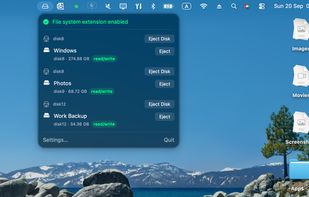
1.6 MB. A menu-bar app and a system extension, written in C and Swift. No background daemons, no telemetry, no account.
Performance
Absolute throughput depends on the disk and the enclosure, so the only honest comparison is against another driver on the same hardware. Measured on the same 1 TB USB SSD, same files, identical test, against Apple’s built-in NTFS driver — the only other kext-free option, and read-only:
+22% faster sequential reads than Apple’s driver
+30% faster random 4 KiB reads than Apple’s driver
Flat delete time regardless of directory size
Faster streaming writes than Apple’s own exFAT driver on the same disk
The driver is not the bottleneck on ordinary USB storage: through the same code on fast internal storage, writes sustain several times the USB figure. Random small-block writes are the one area where it still trails, and that is recorded as open work.






 DrKay added TT NTFS Native as alternative to Paragon NTFS for Mac OS X, Tuxera NTFS for Mac and Mounty for NTFS
 Dr. Karim Badawi


No comments or reviews, maybe you want to be first?