TrayBeat icon
TrayBeat icon

TrayBeat

 Like

TrayBeat is a small application that appears in the system tray as a small icon, plays webradio and m3u playlists under Linux.
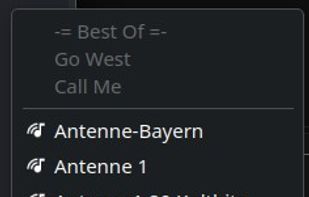
Tray Contextmenu

Cost / License

Application type

Since

  • New

Updated

  • Updated Nov 2026

Platforms

  • Linux  Developed for Kde Plasma, support for Ubuntu and Gnome
0likes
0articles
Save

Features

Properties

Features

Highlights All activities

TrayBeat News & Activities

Recent activities

TrayBeat information

AlternativeTo Category

Audio & Music

GitHub repository

  •  0 Stars
  •  0 Forks
  •  0 Open Issues
  •   Updated  
View on GitHub
TrayBeat was added to AlternativeTo by seven_cy on and this page was last updated .

No comments or reviews, maybe you want to be first?

What is TrayBeat?

This small application lets you play web radio stations and M3U playlists without having a media player window getting in the way. It was primarily developed to let you listen to your favorite music uninterrupted in the background while still keeping control of the player.

What can TrayBeat do?

  • Runs in the background as a tray icon.
  • Can be controlled via the tray icon.
  • Supports the D-Bus StatusNotifierItem interface.
  • Supports MPRIS (Media Player Remote Interfacing Specification), allowing TrayBeat to integrate with the system. Desktops such as KDE can therefore also support the keyboard's media keys.
  • Recognizes common ICY metadata tags from web radio stations.
  • Supports computer suspend and resume, and automatically reconnects afterwards.
  • Supports dark and light themes.
  • Provides an extensive station configuration interface.
  • Includes an integrated media player interface that can be opened when needed.
  • Provides a D-Bus interface that can be used to control TrayBeat remotely.
  • Stations can be configured with a gain value to keep all stations at the same volume level.
  • The tray icon supports the following actions:
  • Left mouse button: next web radio station or next track in the playlist.
  • Middle mouse button: stop/play.
  • Right mouse button: opens the context menu with all configured stations and TrayBeat actions.