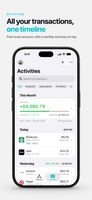
Know where your money goes and whether you're getting ahead, with your net worth and every transaction tracked in one privacy-focused app.
Sync transactions automatically from Apple Wallet and your financial institutions, or add them by hand in seconds. Shortcuts automations can also record each Apple Pay purchase as it happens and pick up transactions and balances from emails, messages, and notifications.
KNOW WHERE YOU STAND
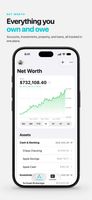
• Your net worth in one number, counting accounts, investments, property, and loans
• A chart of how it has changed, from the last three months to all time
• Accounts in other currencies convert to your default currency at historical exchange rates
SEE WHERE YOUR MONEY GOES
• Money Map shows where your income came from and where it went
• Spending by Nature splits essentials from everything else, so you can see what you could cut back
• Check your spending pace, see your monthly averages, and find your largest transactions
• Transfers and card payments are paired and refunds offset what they reverse, so your totals aren't inflated
• Widgets show your net worth and your Spending Floor, what a typical month costs without the extras
GET ANSWERS IN SECONDS
• How much did you spend eating out this year? Combine more than a dozen filters to find out
• Tap any chart to see the transactions behind it, and keep drilling down
• Save the searches you run often, with And, Or, and None groups for harder questions
• Use your own categories, and nest tags like Trips/2026/Paris to total one trip or the whole year
SPEND LESS TIME ON DATA ENTRY
• Apple Wallet sync: Apple Card, Apple Cash, and Savings in the US, and cards and accounts added to Wallet in the UK
• Financial institution sync through SimpleFIN, with multiple connections
• Import rules clean up merchants and categories as transactions arrive, so you fix a merchant once
• Log a cash purchase from Control Center, a Home Screen quick action, or Siri
• Importing from emails, messages, and notifications uses Apple Intelligence (Beta)
• Bring your history in with CSV import, and take it anywhere with CSV export
TRACK FINANCES TOGETHER
• Share a profile with a partner or family, and changes sync through iCloud
• Keep a profile for each part of your life
SEE THE WAY TO PAYOFF
• How much of each loan payment goes to principal and how much to interest
• The full amortization schedule and an estimated payoff date
• Record extra payments and see the interest and payments they save
KEEP IT PRIVATE
• No ads, no analytics, and nothing sold
• Your device fetches new transactions and balances itself, so we never see them
• Every value the app stores is kept encrypted in iCloud, and with Advanced Data Protection on it is end-to-end encrypted, so not even Apple can read it
• Hide balances with one tap when someone is looking over your shoulder
Financial institution sync also requires a paid account with a SimpleFIN provider you choose, separate from Premium.











 AlexTitarenko added TotalFigures as alternative to You Need A Budget, Lunch Money, Actual Budget, Monarch and 12 more

 Alex Titarenko


No comments or reviews, maybe you want to be first?