TimeYourWeb: Website and Browser Time Tracker
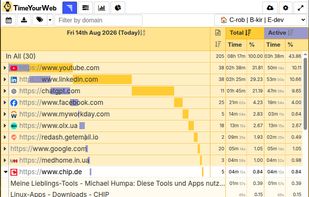
TimeYourWeb helps you understand where your browser time goes. It tracks time spent on websites and individual pages, distinguishes active time from total focused time, and lets you analyze activity through reports, categories, and a chronological timeline.
Designed for freelancers, virtual assistants, remote professionals, and anyone whose work happens mainly in a web browser.
Main features
📊 Website and page tracking
See time spent on each website for a day, week, month, or custom period. Expand websites to see individual pages and page titles.
? Active vs total time
TimeYourWeb separates:
- Active time, when you interact with a page
- Total time, when the page is focused in the browser
This helps distinguish active work from pages that simply remained open.
🏷? Custom categories and rules
Organize activity into categories such as clients, projects, work types, learning, outreach, or personal activity. Rules can match website domains, page URLs, page titles, browser profiles, dates, and time periods.
🕘 Flow timeline
See browsing activity in chronological order. Flow helps reconstruct your day, understand when activity happened, and identify context switching.
📊 Reports and charts
Review activity by website, page, or category and compare browser time across different days and periods.
📤 CSV export
Export activity data to CSV for use in Excel, Google Sheets, or other spreadsheet applications.
💻 Synchronization
Sign in to synchronize supported data between browsers and computers. Availability and limits may depend on your plan.
🔎 Filtering and ignored URLs
Filter reports by website domain and exclude selected URLs from tracking.
🔒 Privacy
TimeYourWeb is designed for transparent productivity analysis, not hidden monitoring.
It does not:
- Record screenshots
- Capture keystrokes
- Collect passwords
- Read private messages
- Record or analyze the body content of web pages
- Accumulate time for inactive background tabs
TimeYourWeb processes information such as visited URLs, page titles, focused-browser time, and interaction timing to create reports.
Who is it for?
TimeYourWeb is useful for freelancers, virtual assistants, remote professionals, small teams, and anyone who wants to understand how their browser time is actually distributed.
Unlike manual timers, TimeYourWeb automatically records browser activity, making it possible to review work even when you forgot to start a timer.
TimeYourWeb is ad-free. Many features are available without payment; some synchronization features or limits may depend on the selected plan.




Comments and Reviews
It is the most detailed tme tracker in browser.