
Tier1Timer icon
Tier1Timer icon

Tier1Timer

Free Windows timer resolution optimizer that reduces input lag with Auto Mode per-game profiles and a built-in latency benchmark.
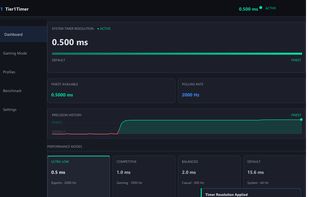
Dashboard with live timer resolution and one-click presets (0.5 ms active)

Cost / License

  • Free
  • Proprietary

Platforms

  • Windows
0likes
0comments
0articles

Features

Tier1Timer News & Activities

Highlights All activities

Recent activities

Tier1Timer information

  • Developed by

    Tier1Settings
  • Licensing

    Proprietary and Free product.
  • Alternatives

    2 alternatives listed
  • Supported Languages

    • English
Tier1Timer was added to AlternativeTo by mbj97 on and this page was last updated .
No comments or reviews, maybe you want to be first?

What is Tier1Timer?

Tier1Timer is a lightweight, free Windows timer resolution optimizer designed for competitive gamers. By default, Windows ticks at ~64 Hz (15.6 ms intervals), causing Sleep(1) calls to overshoot by up to 15 ms. Tier1Timer pushes the tick rate to ~2000 Hz (0.5 ms) with a single click, reducing input latency and smoothing frame pacing without a kernel driver or code injection.

Key features include a live dashboard with one-click presets (0.5 ms / 1.0 ms / 2.0 ms), Auto Mode that automatically applies per-game resolutions and reverts on exit, pre-configured profiles for CS2, Valorant, Fortnite, Apex Legends, Overwatch 2 and others, and a built-in latency benchmark measuring real Sleep(1ms) accuracy with a live 256-sample graph. A multi-layer safety watchdog guarantees resolution restoration even on crash.

The app is fully portable (~1 MB), requires no installation, runs in the system tray, and is digitally code-signed. Designed for competitive FPS and esports titles where frame consistency and input responsiveness matter most.