
Tidymint icon
Tidymint icon

Tidymint

 Like

Free, open-source Mac cleaner that only moves items to the Trash, with Undo, and checks your scripts before deleting duplicates.
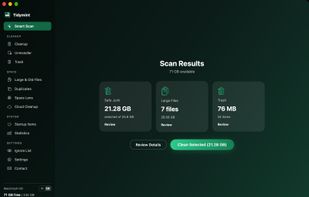
Tidymint screenshot 1

Cost / License

  • Free
  • Open Source (MIT)

Application type

Since

  • New

Updated

  • Updated Oct 2026

Platforms

  • Mac  macOS 14 or later. Currently installed by building from source (one command); a signed download is planned.
0likes
0articles
Save

Features

Properties

Features

Highlights All activities

Tidymint News & Activities

Recent activities

Tidymint information

AlternativeTo Categories

OS & Utilities, File Management

GitHub repository

  •  2 Stars
  •  0 Forks
  •  0 Open Issues
  •   Updated  
View on GitHub
Tidymint was added to AlternativeTo by tidymint on and this page was last updated .

No comments or reviews, maybe you want to be first?

Official Links

What is Tidymint?

Tidymint is a free, MIT-licensed disk cleaner for macOS. It finds caches, logs, old installers, large and duplicate files and app leftovers, explains what each item is, and moves only what you select to the Trash. The last clean can be undone, and nothing is deleted permanently until you empty the Trash yourself.

Every group is labeled safe, review or locked, so risky items are never pre-selected. Photos libraries, Mail, keychains, passwords and cloud storage roots are never touched.

Main features: Smart Scan for caches, logs, npm cache and old downloads; Clean by App for per-app data in Chrome, Edge, CapCut, Zalo and Coc Coc, with chat media sorted by month and messages locked; a duplicate finder that checks whether scripts in your project folders still reference a file before deleting it; Space Lens, a bubble map of what takes up space; an uninstaller that also removes leftovers; a startup items viewer; a free-space history chart; and a menu bar indicator that shows free space and warns when the disk is nearly full or RAM use passes 90%.

Works offline, needs no account and has no tracking. Interface in English and Vietnamese. macOS 14 or later, Apple silicon and Intel. Not notarized yet, so on first launch macOS asks you to choose Open Anyway in System Settings.