





TidyList
Like
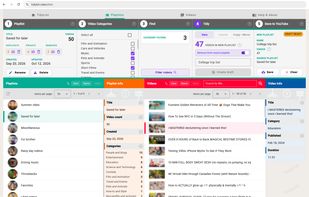
Browser-based YouTube playlist organizer that filters videos by category or title, lets you create a new playlist or copy or move selections in bulk, and counts duplicate, private, removed, and hidden unavailable videos before previewing and confirming changes.

Cost / License
- Freemium (Pay once)
- Proprietary
Since
- New


Features

Highlights All activities
TidyList News & Activities
Recent activities
- Sam Wootton updated TidyList
- Sam Wootton updated TidyList
- Sam Wootton updated TidyList
- Sam Wootton updated TidyList
- Sam Wootton added TidyList
 Fla added TidyList as alternative to TrackRescue, Multi-Select For YouTube and Todij Playlist Manager
- Fla updated TidyList
- Sam Wootton updated TidyList
 Sam Wootton added TidyList as alternative to Multi-Select For YouTube, TrackRescue and PocketTube


Developed by
 Sam Wootton
Licensing
Proprietary and Freemium product.Pricing
One time purchase (perpetual license) that costs $7 + free version with limited functionality.Alternatives
4 alternatives listedBadge
Get an embeddable badge for TidyListSupported Languages


No comments or reviews, maybe you want to be first?