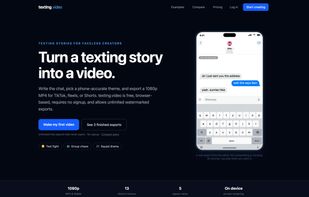
texting.video is a browser-based tool for creating fake text message and chat-story videos—the kind popular with creators on TikTok, Instagram Reels, and YouTube Shorts.
To build a video, you just type out the dialogue or paste a full script using a simple "Name: message" format. Once you choose a theme, the app automatically animates the conversation with realistic typing delays, typing indicators, an on-screen keyboard, emoji reactions, read receipts, and customizable time gaps. You can watch the animated preview live in your browser and export a 1080p MP4 or WebM video instantly.
It comes with 13 themes covering classic and modern iMessage, SMS, Android/RCS, WhatsApp, Discord, Slack, Microsoft Teams, a retro terminal, a JRPG dialogue box, and even a true-crime documentary style. It supports five aspect ratios (9:16, 4:5, 3:4, 1:1, and 16:9), along with an optional social-safe frame overlay that prevents TikTok and Instagram UI elements from covering up your captions.
Because everything renders client-side in your browser, there are no file uploads, no waiting in server queues, and no account required to start creating and exporting. Conversations automatically save to your browser, though creating a free account lets you keep a permanent saved library. The free plan includes full access to every tool with unlimited watermarked exports, while the Creator Pro upgrade removes the watermark.
It also integrates directly with AI assistants via Model Context Protocol (MCP). Tools like Claude and ChatGPT can generate a full scene for you and return a direct link that opens the finished draft straight in the editor, ready to review, tweak, and export.




 colinurbs added texting.video as alternative to CapCut

 Threadlimit LLC
No comments or reviews, maybe you want to be first?