terminalhinter icon
terminalhinter icon

terminalhinter

 Like

terminalhinter is a free, open source autocomplete dropdown for the terminal. As you type in zsh, bash, fish or PowerShell, a list opens under the cursor with subcommands, options, folders, git branches and npm scripts, each with a short description.
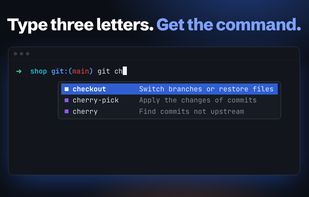
Commands, options and branches show up under the cursor as you type, each with a short description.

Cost / License

  • Free
  • Open Source (MIT)

Since

  • New

Updated

  • Updated Nov 2026

Platforms

  • Windows
  • Mac
  • Linux
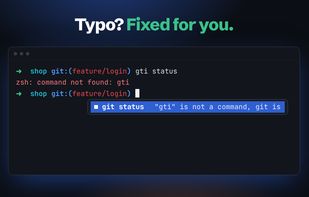
After a failed command, the empty line offers the fix. A typo like gti becomes git status, and Tab puts it on the line.
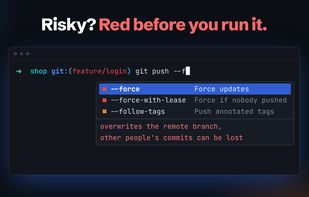
Options that delete or overwrite, like --force, are marked red and say what can go wrong before you run them.
+1
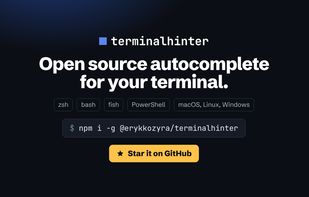
Open source, for zsh, bash, fish and PowerShell on macOS, Linux and Windows. Install with npm i -g @erykkozyra/terminalhinter.
Alternatives
0likes
0alternatives
0articles
Save

Features

Properties

Features

Highlights All activities

terminalhinter News & Activities

Recent activities

terminalhinter information

AlternativeTo Category

Development

GitHub repository

  •  3 Stars
  •  0 Forks
  •  0 Open Issues
  •   Updated  
View on GitHub
terminalhinter was added to AlternativeTo by eKozyra on and this page was last updated .

No comments or reviews, maybe you want to be first?

Official Links

What is terminalhinter?

terminalhinter is a free, open source autocomplete dropdown for the terminal. As you type in zsh, bash, fish or PowerShell, a list opens under the cursor with subcommands, options, folders, git branches and npm scripts, each with a short description. It covers more than 700 command line tools out of the box.
It goes further than plain Tab completion:

  • After a failed command, the empty line offers the fix: a typo like gti becomes git, a missing upstream branch, a folder that needs -p, a port that is taken.
  • Options that delete or overwrite, like --force or reset --hard, are marked red and say why. Ctrl+G explains every word of a line before you run it.
  • It reads your project: package.json scripts with what they run, Makefile targets with their descriptions, docker compose services, workspaces, and branches with the age and message of their last commit.
  • Enter walks into folders and keeps the list open, so a few presses take you deep into a project.
  • The list learns what you use and puts it first.

The list is drawn inside the terminal you already use, so there is no app in the menu bar, no Accessibility permission, no account and no telemetry. It works in iTerm2, Terminal.app, Ghostty, WezTerm, Kitty, VS Code, Windows Terminal and inside tmux.

Coming from Fig or Kiro CLI? thint migrate removes their startup lines from your shell config in one command.

Install with npm i -g @erykkozyra/terminalhinter, then run thint init.