
Telebeam icon
Telebeam icon

Telebeam

 Like

Turns a Google TV or Android TV into a receiver for your Mac's built-in Screen Mirroring. No Apple TV, nothing to install on the Mac.
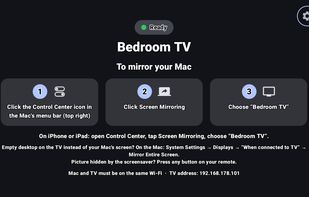
Ready on the TV: its name and the three steps to mirror a Mac

Cost / License

Application type

Since

  • New

Updated

  • Updated Nov 2026

Platforms

  • Android TV  Android 7 or later. Receives Screen Mirroring from a Mac, iPhone or iPad on the same Wi-Fi.
  • Google TV
0likes
0articles
Save

Features

Features

Highlights All activities

Telebeam News & Activities

Recent activities

Telebeam information

AlternativeTo Category

System & Hardware

GitHub repository

  •  0 Stars
  •  0 Forks
  •  0 Open Issues
  •   Updated  
View on GitHub
Telebeam was added to AlternativeTo by sebs_tech on and this page was last updated .

No comments or reviews, maybe you want to be first?

What is Telebeam?

Telebeam turns a Google TV or Android TV into a receiver for the Screen Mirroring that is already built into the Mac. Open Telebeam on the TV, click Control Center and Screen Mirroring on the Mac, and pick the TV: the Mac's screen is on the TV, with no Apple TV or extra box and nothing to install on the Mac. iPhone and iPad Screen Mirroring work too.

Mirror the Mac or use the TV as a second display, with sound and up to 4K (Auto uses 1080p at 60 fps; 4K and 120 fps are marked Beta). Everything stays on the home network: the Mac and the TV only need the same Wi-Fi. No account, no ads, no data collected, and the app is open source under GPL-3.0.

Runs on Google TV and Android TV with Android 7 or later, including TVs from Sony, TCL, Hisense and Philips, Chromecast with Google TV, Google TV Streamer, Nvidia Shield and Android TV boxes. Start with a 7-day free trial on Monthly, or buy Lifetime once. Telebeam is an independent app and is not made by Apple.