SCREEN ANNOTATION & PRESENTATION TOOLS FOR MAC
TeacherPalette helps teachers, trainers, and presenters explain ideas clearly with screen annotation, audience focus tools, and a multi-page whiteboard.
DRAW DIRECTLY ON YOUR SCREEN
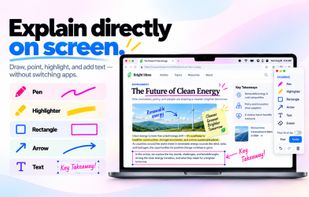
Draw, highlight, and add arrows, shapes, and text over almost anything on your Mac. Customize your tools with a Custom Palette, keyboard shortcuts, and Apple Pencil pressure sensitivity through Sidecar.
GUIDE YOUR AUDIENCE'S ATTENTION
- Spotlight highlights important areas by dimming the surrounding screen.
- Laser Pointer directs attention without leaving marks.
- Magnifier enlarges details while keeping the surrounding context visible.
- Cursor Highlight, Click Highlight, and Custom Cursor make on-screen actions easier to follow.
MULTI-PAGE WHITEBOARD
Develop ideas across multiple pages with Blank, Grid, Lined, Cornell, and Chalkboard templates. Add drawings, images, and links. Your work is saved automatically so you can return to it later.
PDF ANNOTATION
Import PDF documents into Whiteboard, annotate them page by page, and export your work as a PDF. Ideal for lessons, training materials, and presentations.
QR CODE SCANNING
Scan QR codes displayed on your Mac screen and open links directly in your browser without using your phone.
BUILT FOR MAC
- Multiple display support
- Sidecar and Apple Pencil compatibility
- Light and Dark Mode
- Interface localized in 9 languages
- Tools for teaching, software demonstrations, presentations, and video creation
FREE TRIAL & PURCHASE OPTIONS
Eligible new subscribers can try all features free for 7 days with a Monthly or Annual subscription.
Continued access requires a Monthly or Annual subscription or a one-time Lifetime purchase. There is no permanently free plan.
TeacherPalette brings annotation, presentation, and whiteboarding tools together in one Mac app.






 Aaron-K added TeacherPalette as alternative to DemoPro, Presentify, ZoomIt, Epic Pen and 1 more


 Kim Woohyeok


No comments or reviews, maybe you want to be first?