
TavrendoPass icon
TavrendoPass icon

TavrendoPass

 Like

Windows folder checking, comparison and SHA-256 verification software with reusable delivery Profiles and workflow-specific reports.
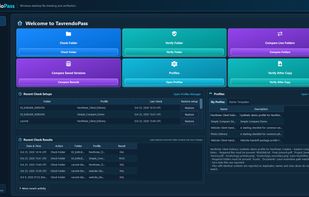
TavrendoPass 1.1.1 home dashboard with workflows for checking delivery folders, verifying files against Saved Records, and comparing live folders or saved versions.

Cost / License

  • Pay once
  • Proprietary

Application type

Since

  • New

Platforms

  • Windows
0likes
0articles
Save

Features

Properties

Features

Highlights All activities

TavrendoPass News & Activities

Recent activities

TavrendoPass information

  • Developed by

    US flagRDMEE LLC
  • Licensing

    Proprietary and Commercial product.
  • Pricing

    One time purchase (perpetual license) ranging between $29 and $39.
  • Alternatives

    6 alternatives listed
  • Badge

    Get an embeddable badge for TavrendoPass
  • Supported Languages

    • English

AlternativeTo Category

File Management
TavrendoPass was added to AlternativeTo by TavrendoPass on and this page was last updated .

No comments or reviews, maybe you want to be first?

What is TavrendoPass?

TavrendoPass is Windows desktop software for checking delivery folders, comparing folders and verifying files against saved reference records.

Check Folder applies reusable Profiles containing requirements for files and folders, extensions, counts, sizes, filenames, numbered sequences and exact duplicate content. Users can create, edit, copy and test Profiles.

Verify Folder compares a current folder against a Saved Record using file paths and SHA-256 fingerprints. Compare Live Folders compares two current folders, while Compare Saved Versions compares two recorded states. Results can identify missing, unexpected, added, removed, modified and unchanged files, depending on the workflow.

Reporting includes HTML and CSV, with PDF receipts available for Check Folder and readable text reports for verification. JSON Saved Records provide references for later verification rather than backup copies.

Checks run locally without modifying source files. TavrendoPass does not copy, synchronize or repair files, or compare document paragraphs. Initial license activation requires internet access.

Available for Windows 10 and 11, 64-bit, with a seven-day trial.