


Tally - Word Counter icon

Tally - Word Counter

 1 like

Your favorite dark mode word counter, now with even more themes! Count the number of characters, words, sentences, paragraphs, and lines in your text instantly with Tally.
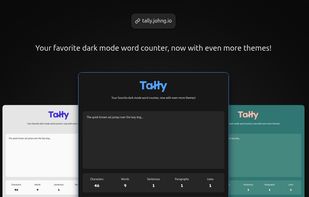
Social preview

Cost / License

Application type

Since

  • Since 2025

Updated

  • Updated Nov 2026

Releases

  • 30 releases last year30 last year

Platforms

  • Online
1like
0articles
Save

Features

Properties

Features

Highlights All activities

Tally - Word Counter News & Activities

Recent activities

Tally - Word Counter information

AlternativeTo Categories

Office & Productivity, Security & Privacy

GitHub repository

  •  5 Stars
  •  4 Forks
  •  33 Open Issues
  •   Updated  
View on GitHub
Tally - Word Counter was added to AlternativeTo by John Goodliff on and this page was last updated .

No comments or reviews, maybe you want to be first?

Official Links

What is Tally - Word Counter?

Tally - Word Counter is a free online tool to count the number of characters, words, paragraphs, and lines in your text. It can also show counts for different types of characters like letters, digits, spaces, punctuation, and symbols/special characters. Tally runs entirely in your browser, with no accounts, ads, or privacy-invasive tracking. Unlike many tools, it supports multiple languages, computes counts in real-time, and offers a modern, themeable interface (including dark mode). Make sure you have the right number of words for your essay or post by counting them instantly with Tally.

FEATURES

• 🧮 Text statistics: Analyze your text in multiple ways • View general counts: characters, words, sentences, paragraphs, and lines • View character counts by type: spaces, digits, letters, punctuation, and symbols/special characters • 🚀 Real-time updates: Optimized for speed, Tally updates the counts in real-time as you type • 🌍 Multilingual support: Accurate token segmentation and classification across many languages and scripts • 🎨 Themes: Save your eyes with the built-in dark mode, or try one of the other included themes • 🎛? Options: Customize your experience with various options • Warn on large input text: Avoid accidentally pasting large amounts of text • Remember input text: Save your text locally to continue where you left off • Enable debug logging: Print debug logs to the console for troubleshooting purposes • 🆓 100% Free & Ad-Free: Use the tool without distractions, privacy-invasive tracking, or paywalls — no ads, no sign-ups, no limitations • 👨🏻?💻 Open-source: Know how to code? Help make Tally better by contributing to the project on GitHub, or copy it and make your own version!

USE CASES

• 📚 Students & Educators: Check essay lengths and assignment limits quickly and accurately. • ?? Writers & Bloggers: Track writing progress and optimize structure for readability. • 📄 Legal & Business Professionals: Ensure documents meet required character or word counts. • 📱 Social Media Managers: Stay within platform limits for tweets, posts, and bios. • 🧪 Developers & Testers: Analyze input strings and view line counts for code and data. • 🌐 SEO Specialists: Optimize content length for meta descriptions, headings, and body text.