Table Export icon
Table Export icon

Table Export

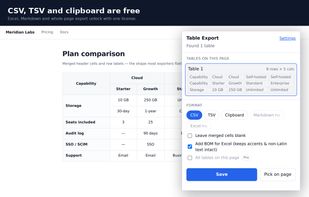
Table Export copies any HTML table on a web page to CSV, TSV, Excel or the clipboard, with merged cells (colspan / rowspan) filled in where they belong. Click the toolbar icon and every data table on the page is listed with its size and a preview, or pick one directly on the...
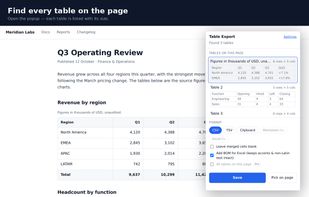
Every data table on the page, listed with its size and a preview.

Cost / License

  • Freemium (Pay once)
  • Proprietary

Platforms

  • Microsoft Edge
  • Google Chrome
CSV, TSV and clipboard are free. Excel and Markdown are part of the paid upgrade.
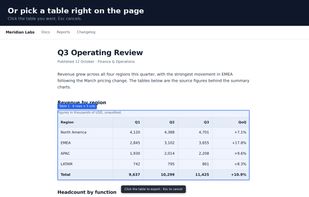
Or pick a table right on the page, by clicking the one you want.
+2
Merged cells stay in the right place when the table is exported.
Alternatives
0likes
0alternatives
0articles
Save

Features

  1.  Export to CSV
  2. Microsoft Excel icon  Export to Excel

Table Export News & Activities

Highlights All activities

Recent activities

Table Export information

  • Developed by

    infora
  • Licensing

    Proprietary and Freemium product.
  • Pricing

    One time purchase (perpetual license) that costs $19 + free version with limited functionality.
  • Alternatives

    0 alternatives listed
  • Badge

    Get an embeddable badge for Table Export
  • Supported Languages

    • English
Table Export was added to AlternativeTo by infora on and this page was last updated .

No comments or reviews, maybe you want to be first?

What is Table Export?

Table Export copies any HTML table on a web page to CSV, TSV, Excel or the clipboard, with merged cells (colspan / rowspan) filled in where they belong. Click the toolbar icon and every data table on the page is listed with its size and a preview, or pick one directly on the page.

Free: CSV and TSV files, clipboard copy that pastes into Google Sheets, Excel or Numbers with columns intact, optional UTF-8 BOM so accented and non-Latin text opens correctly, no row limit and no account. Rows hidden on screen are left out and the count is shown; page-layout tables are kept out of the list.

An optional paid upgrade adds Excel (.xlsx) output where plain numbers and ISO dates become real number and date cells, Markdown output, and exporting every table on the page into one workbook with a sheet per table.

The extension runs only in the tab where the icon is clicked. There is no server and no account, conversion happens locally, and table contents are never uploaded anywhere.