Sysvia connects your Windows, Mac and Linux computers so they work as one workspace. Share a single keyboard and mouse, share the clipboard, keep folders in sync, and see or use another computer's screen, all from one app.
KEYBOARD AND MOUSE
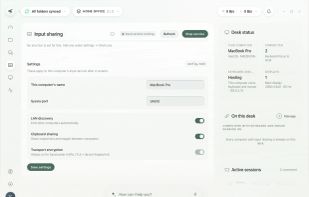
Arrange your computers around your displays in a visual desk layout, then move the pointer past a screen edge to carry on with the next computer using the same keyboard and mouse. A shortcut returns control to the computer you are on, and Game mode pauses sharing so the cursor stays in your game.
CLIPBOARD
Copy text, links and images on one computer and paste them on another.
FOLDER SYNC
Choose a folder and which computers share it. Send and Receive keeps both sides up to date, or use Send Only or Receive Only for one-way sharing. Edits and deletions carry across, and Sysvia keeps an extra conflict copy when two edits collide. Folder sync catches up on its own when computers reconnect.
SCREENS AND REMOTE ACCESS
View another computer's screen and control it when that computer allows it, or use its monitors as extra desktop space and drag windows onto them. Screen access is off by default and controlled separately from keyboard and mouse sharing. You choose which computers may ask, and a sharing bar with a Stop button stays on screen while someone is looking.
CONNECTIONS AND SECURITY
Sysvia tries a direct connection between your computers first. For different networks, an optional encrypted relay is available, with a monthly allowance that depends on your plan. Traffic between your computers is encrypted.
PRICING
A one-time purchase with no required subscription. Personal is $19.99 for up to 5 computers. Pro is $39.99 for up to 15. Both include a 30-day money-back guarantee. The installer is free to download, but a licence is needed to connect computers.
GOOD TO KNOW
Linux input sharing depends on your desktop session, and native Wayland input support is still in development. Extended monitors on Windows need a display driver, installed with your permission. Screen performance depends on your hardware and network.








 Levi Carpenter added Sysvia as alternative to across, Multiplicity, Input Leap, Barrier and 4 more

 DigitxlLink-LLC



No comments or reviews, maybe you want to be first?