
Supercut - AI Video Editor icon

Supercut - AI Video Editor

A privacy-first AI video editor: describe your edit in plain words and it runs in your browser, so your video is never uploaded.
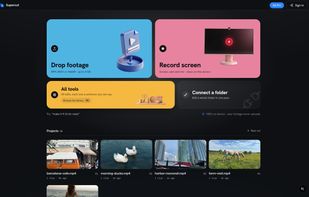
Supercut - AI Video Editor screenshot 1

Cost / License

  • Freemium (Pay once or Subscription)
  • Proprietary

Application type

Platforms

  • Mac
  • Windows
  • Online
1like
0comments
0articles

Features

Properties

  1.  Privacy focused
  2.  AI-Powered

Features

  1.  Hardware Accelerated
  2.  Live Preview
  3.  Support for 4K
  4.  Screen Recording
  5.  Subtitles and captions

Supercut - AI Video Editor News & Activities

Highlights All activities

Recent activities

Supercut - AI Video Editor information

  • Developed by

    SG flagSupercut
  • Licensing

    Proprietary and Freemium product.
  • Pricing

    One time purchase that costs $199, and / or subscription ranging between $5 and $10 per month + free version with limited functionality.
  • Alternatives

    5 alternatives listed
  • Supported Languages

    • English

AlternativeTo Categories

Video & MoviesSystem & Hardware

Popular alternatives

View all
Supercut - AI Video Editor was added to AlternativeTo by Harsh Manwani on and this page was last updated .
No comments or reviews, maybe you want to be first?

What is Supercut - AI Video Editor?

Supercut is a privacy-first AI video editor that runs entirely on your own device. Instead of learning a timeline full of buttons, you describe the edit you want in plain words, like "trim to the best 30 seconds and add captions", and Supercut makes the cut for you. The AI only ever sees text about your video, such as its length and dimensions, never the actual footage, so nothing is uploaded to a server.

It covers about 42 editing operations, including trim, crop, speed changes, reverse, stabilization, face blur, smart reframe, audio cleanup, looks, and platform export presets. Auto captions and subtitles are generated on-device with Whisper, with word-level timing, style controls, and .srt export. A full multitrack Studio timeline is available for trim, speed, crop, effects, and picture-in-picture edits.

Supercut runs on the web and as a desktop app for macOS and Windows. The desktop app adds a built-in screen recorder that captures your screen, camera, and microphone as separate tracks, with automatic zoom on your cursor. There is a free plan to start, with paid plans for heavier use.

Official Links
